Tutorial: Build Your Own Negotiation Support Agent
In this tutorial you build a Negotiation Support Agent — an assistant that sits next to a human negotiator in HANI and helps them during a live negotiation — and grow it step by step, from a 6-line agent with no AI at all to a useful deal coach. Every level is a small, runnable Python file and ends with an experiment in the HANI interface running on your own machine.
| Level | You build | You learn | Needs an LLM? |
|---|---|---|---|
| 0 | — | Install HANI and open the interface | no |
| 1 | An agent that echoes your message | The SupportAgent class and how HANI loads yours |
no |
| 2 | A rule-based advisor | Reading the live negotiation state | no |
| 3 | An LLM coach | System prompts and local models (Ollama) | yes |
| 4 | A coach with its own tool | Tool calling | yes |
| 5 | The finished Deal Coach | Proactive advice, safe autonomy | yes |
| 6 | A guided agent | Show/hide tools, chat, toast and the status board at any moment | no |
| 7 | An asking coach | Asking the user a question and adapting to the answer | optional |
All the code lives in
examples/support_agent_tutorial/.
Levels 0–2 work with no model at all, so you can stop there and still have a working agent.
Your screen will look a little different
HANI's playground builds a fresh scenario for each session, so the issues, numbers and partner offers in your session will differ from the screenshots. The behaviour is what matters.
Level 0: Install and look around
1. Install HANI (Python 3.13 or newer):
2. Create the settings folder:
This creates ~/negmas/hani/settings/, which is where the agent's settings will live.
3. Get the tutorial files (or write them yourself as you go):
4. Start the playground — the guest app needs no login:
Why PYTHONPATH?
HANI runs as a separate server process and imports your agent by name. The folder
that holds your agent file must therefore be importable by that process.
PYTHONPATH=$PWD does exactly that. If you forget it, HANI prints
could not load custom agent_class …; using default and silently uses the built-in
agent — see Troubleshooting.
Open http://localhost:5008/app. Click Start to begin a negotiation against a built-in opponent. You will see the offers, the analysis tools, and, at the bottom right, a round chat bubble. That bubble is the Support Agent; click it to open its chat.
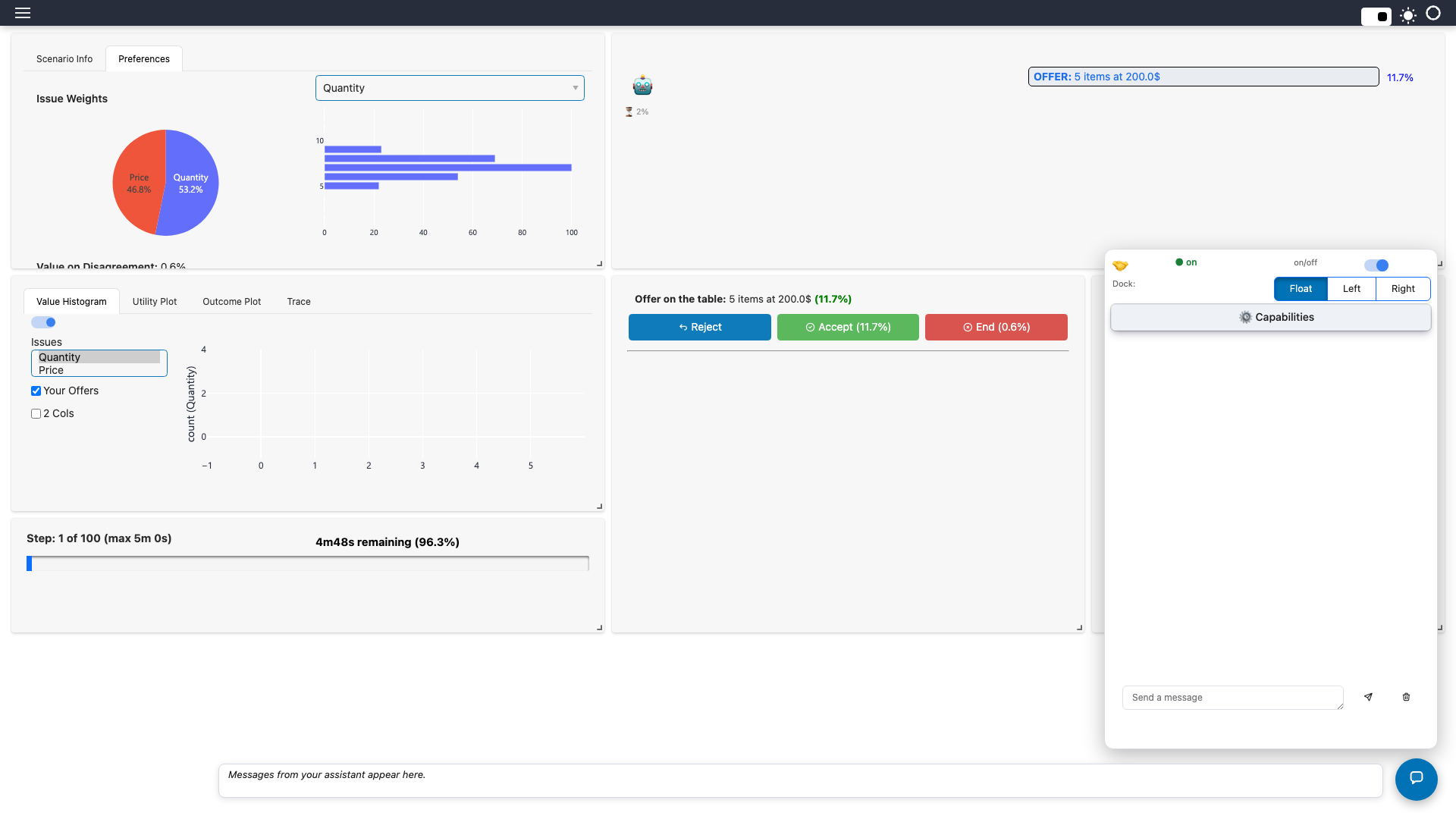
Out of the box this is the built-in agent, which needs an LLM to answer. Let's replace it with our own.
Level 1: The simplest possible agent
An agent is a subclass of SupportAgent. HANI calls its handle_user_message every time
the human types in the chat. self.post(...) writes a reply.
from hani.support_agent.runtime import SupportAgent


class HelloAgent(SupportAgent):
    def handle_user_message(self, text: str) -> None:
        self.post(f"Hello! You said: {text}")
That is the whole agent. No model, no network. To tell HANI to use it, edit
~/negmas/hani/settings/support_agent_settings.json (create it if it does not exist):
The format is module:Class. Restart the playground
(PYTHONPATH=$PWD hani guest), click Start, open the chat bubble and type hello?:
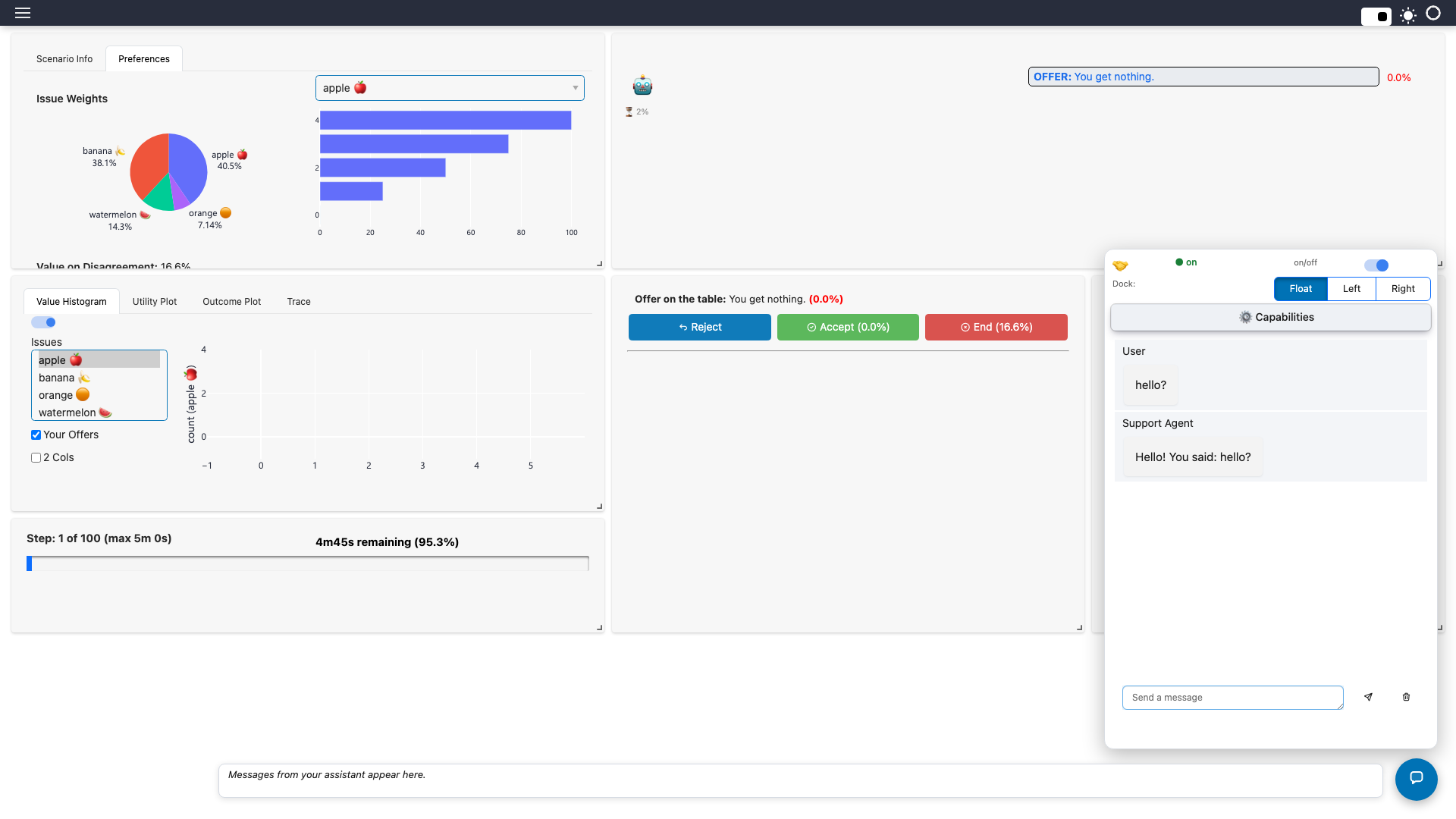
Experiment
Change the reply text, restart, and chat again. Anything you self.post appears in
the chat as the Support Agent. You are now running your own agent inside HANI.
Level 2: An agent that reads the negotiation
A useful assistant knows what is happening. HANI exposes the live negotiation through
session_state["actions"]["context"](), which returns the issues, the partner's offer,
its utility to you, your reserved value, the draft offer, the time elapsed, and the
history.
The chat handler runs on a worker thread, while the interface lives on another. Read
interface state through self.run_on_doc(...), which hops to the right thread for you.
from hani.support_agent.runtime import SupportAgent


class RulesAgent(SupportAgent):
    def handle_user_message(self, text: str) -> None:
        actions = self.session_state.get("actions")
        if not actions:  # no negotiation has been loaded yet
            self.post("Load a scenario and start a negotiation first.")
            return

        # We are on a worker thread: read UI-owned state via run_on_doc.
        ctx = self.run_on_doc(actions["context"])

        offer = ctx["partner_offer"]
        if offer is None:
            self.post("Your partner has not made an offer yet.")
            return

        utility = ctx["partner_offer_utility"]
        reserved = ctx["reserved_value"]
        if utility < reserved:
            advice = "That is **worse than walking away** - do not accept it."
        else:
            advice = "That beats your reserved value - it could be acceptable."
        offer_text = ", ".join(f"{issue}: {value}" for issue, value in offer.items())
        self.post(
            f"Partner offer: {offer_text}\n\n"
            f"Worth **{utility:.0%}** to you (reserved value {reserved:.0%}). {advice}"
        )
Point the settings at it: { "agent_class": "level2_rules:RulesAgent" }, restart, click
Start, then Reject → Send to make a counter-offer and let the partner answer.
Ask What do you think of the offer?:
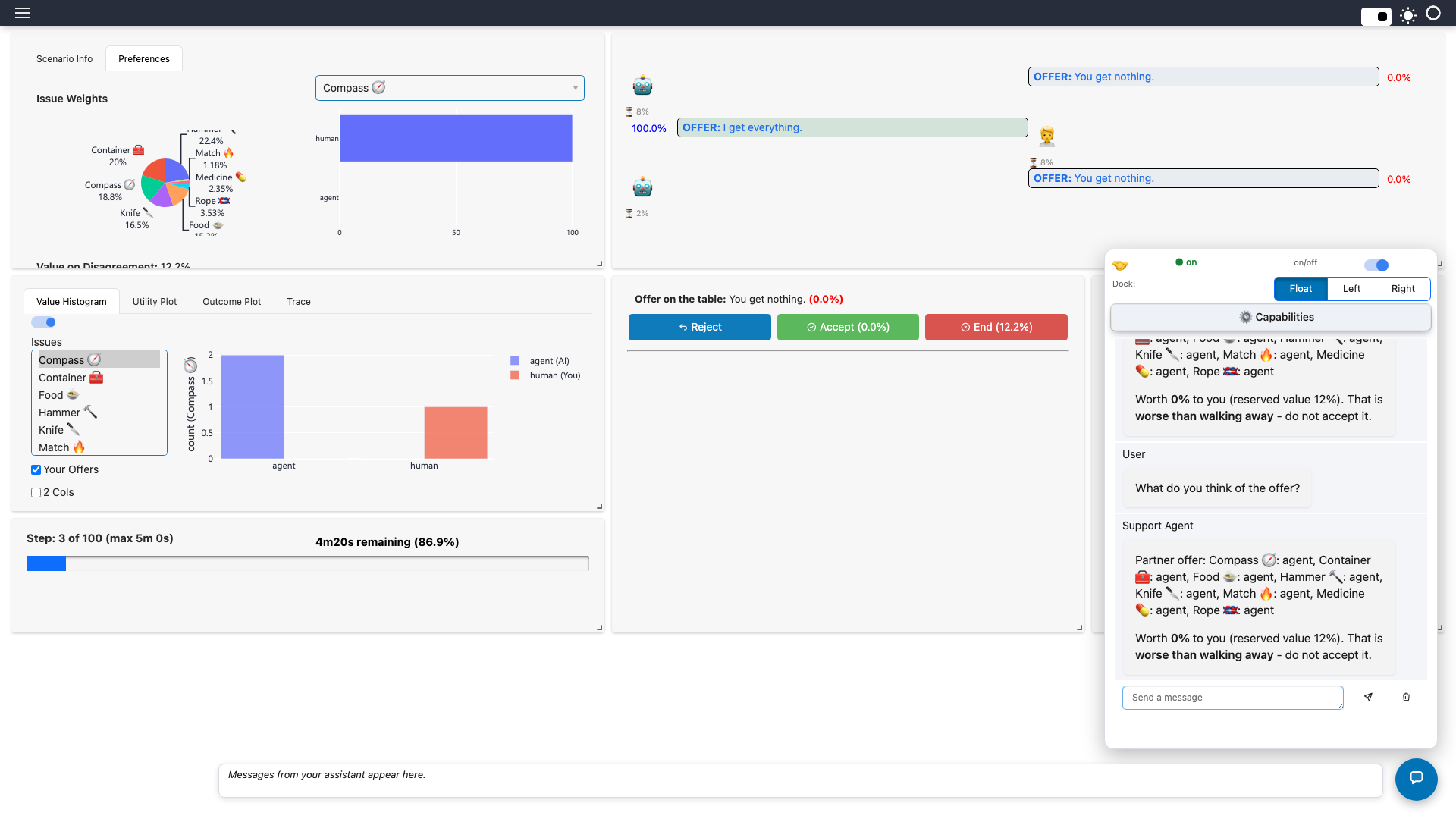
Experiment
Make a few different counter-offers. Watch the verdict flip between worse than walking away and could be acceptable as the partner's offer changes.
This agent is predictable and free, but it only understands one question. For open-ended conversation we need a language model.
Level 3: Give it a brain
Now we let an LLM do the talking. HANI already runs the full tool-calling loop; all you
supply is the persona, by overriding build_system_prompt. The live negotiation
state is attached to every message automatically.
from hani.support_agent.runtime import SupportAgent

COACH_PROMPT = """You are a calm, concise negotiation coach.
You always receive the live negotiation state with the user's message.
Rules:
- Answer in at most three short sentences.
- Compare the partner's offer with the user's reserved value before advising.
- Never tell the user to accept an offer worth less than their reserved value.
- Never reveal the user's utility numbers to the partner."""


class CoachAgent(SupportAgent):
    def build_system_prompt(self) -> str:
        return COACH_PROMPT
Pick a model
The screenshots in Levels 3 to 7 were made with Gemma served through
Ollama (gemma4:cloud), which follows instructions and calls tools
reliably. Add it to your settings next to agent_class:
Any other litellm provider works too (see
Setting up Ollama). A small local model such as the default qwen3:4b-instruct
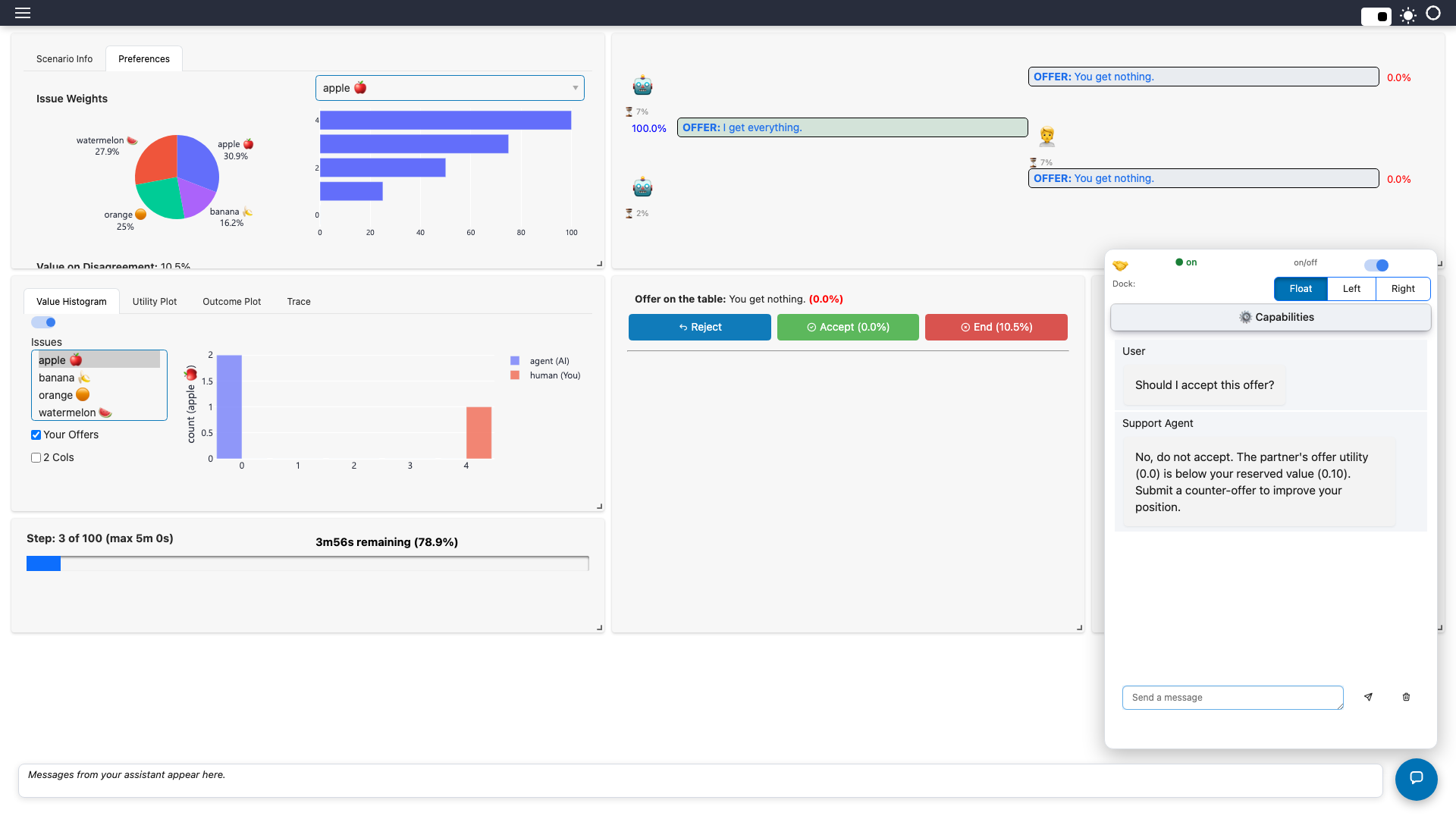
runs fully offline but follows tool instructions less reliably. Restart, Start, make a
counter-offer (Reject, then Send) and ask Should I accept this offer?:
Experiment
Edit COACH_PROMPT: make the coach aggressive, or make it reply in another language.
Restart and compare. The prompt alone changes the whole personality.
Small models are not perfect
A 4B-parameter model can misjudge numbers. That is the motivation for the next level: do the arithmetic in code and let the model explain it.
Level 4: Give it a tool
A tool is a Python function the model may call. We add one that makes the accept / counter / end decision deterministically — comparing the offer with your reserved value and with a target that relaxes as the deadline nears — so the model no longer has to do the maths.
from hani.support_agent.runtime import SupportAgent
from hani.support_agent.tools import ToolDispatcher, make_function_schema

from level3_llm_coach import COACH_PROMPT


class CoachDispatcher(ToolDispatcher):
    def register_extra_tools(self) -> None:
        self.register(
            "assess_partner_offer",
            self._assess,
            lambda: make_function_schema(
                "assess_partner_offer",
                "Judge the partner's current offer against the user's reserved "
                "value and a target that relaxes as the deadline nears. Call this "
                "before recommending accept / counter / end.",
                {},
                [],
            ),
            capability=None,  # always available (it only reads state)
        )

    def _assess(self, args: dict) -> dict:
        ctx = self.runtime.run_on_doc(self.ss["actions"]["context"])
        utility = ctx["partner_offer_utility"]
        if utility is None:
            return {"ok": False, "error": "the partner has not made an offer yet"}
        reserved = ctx["reserved_value"]
        time = ctx["relative_time"] or 0.0
        target = max(reserved, 0.9 - 0.4 * time)  # 90% at the start, 50% at the end
        if utility < reserved:
            verdict = "end_or_counter"  # worse than walking away
        elif utility >= target:
            verdict = "accept"
        else:
            verdict = "counter"
        return {
            "ok": True,
            "verdict": verdict,
            "offer_utility": round(utility, 3),
            "reserved_value": round(reserved, 3),
            "target_now": round(target, 3),
        }


class ToolCoachAgent(SupportAgent):
    dispatcher_class = CoachDispatcher

    def build_system_prompt(self) -> str:
        return COACH_PROMPT + "\nUse assess_partner_offer to judge any offer."
Three pieces: a schema that tells the model what the tool is for, a handler that
does the work and returns a dict, and dispatcher_class to plug it in. Set
{ "agent_class": "level4_tools:ToolCoachAgent", "provider": "ollama", "model": "gemma4:cloud" }, restart, and ask
Should I accept this offer?:
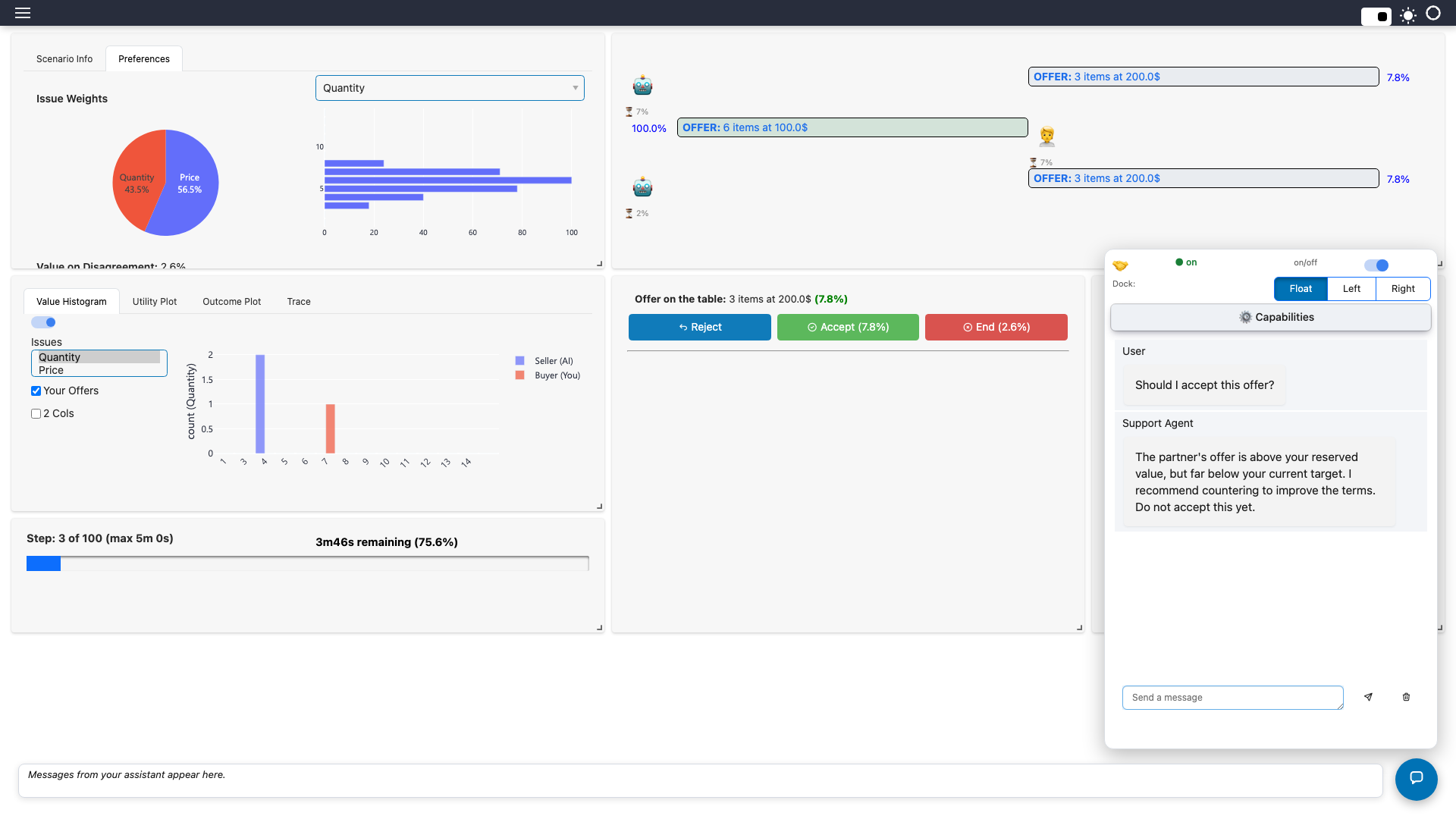
Experiment
Change the 0.9 - 0.4 * time target curve to be more stubborn, restart, and see the
verdict change for the same offer.
Level 5: The finished Deal Coach
Two things turn a chatbot into a useful assistant: it speaks up without being asked, and it can act — but only as far as you let it.
Proactive advice. HANI calls proactive_note(event) on lifecycle events. Return a
note to make the agent take a turn; return None to stay silent.
from hani.support_agent.runtime import SupportAgent

from level4_tools import CoachDispatcher
from level3_llm_coach import COACH_PROMPT


class DealCoach(SupportAgent):
    dispatcher_class = CoachDispatcher

    def build_system_prompt(self) -> str:
        return (
            COACH_PROMPT
            + "\nUse assess_partner_offer to judge any offer."
            + "\nWhen you propose a counter-offer, fill it in with set_offer and "
            "set_message_text so the user can review it before sending."
        )

    def proactive_note(self, event_name: str) -> str | None:
        if event_name == "action_requested":
            return (
                "(system) It is the user's turn. Call assess_partner_offer, then "
                "give ONE sentence: accept, counter, or end - and why."
            )
        return None  # stay silent on every other event
Safe autonomy. The settings decide what the agent is allowed to do. For a coach, let it fill in offers but never send, accept or end on its own:
{
  "agent_class": "level5_deal_coach:DealCoach",
  "autonomy": "suggest",
  "capabilities": { "submit_counter": false, "accept": false, "end": false },
  "proactive": { "on_action_requested": true }
}
proactive.on_action_requestedmakes the agent comment each time it is your turn.autonomy: "suggest"means that if the agent proposes something, it fills the fields and highlights the button — you press it.- Turning off
submit_counter,acceptandendremoves those tools from the model entirely.
Add "provider": "ollama", "model": "gemma4:cloud" as before, restart and click Start.
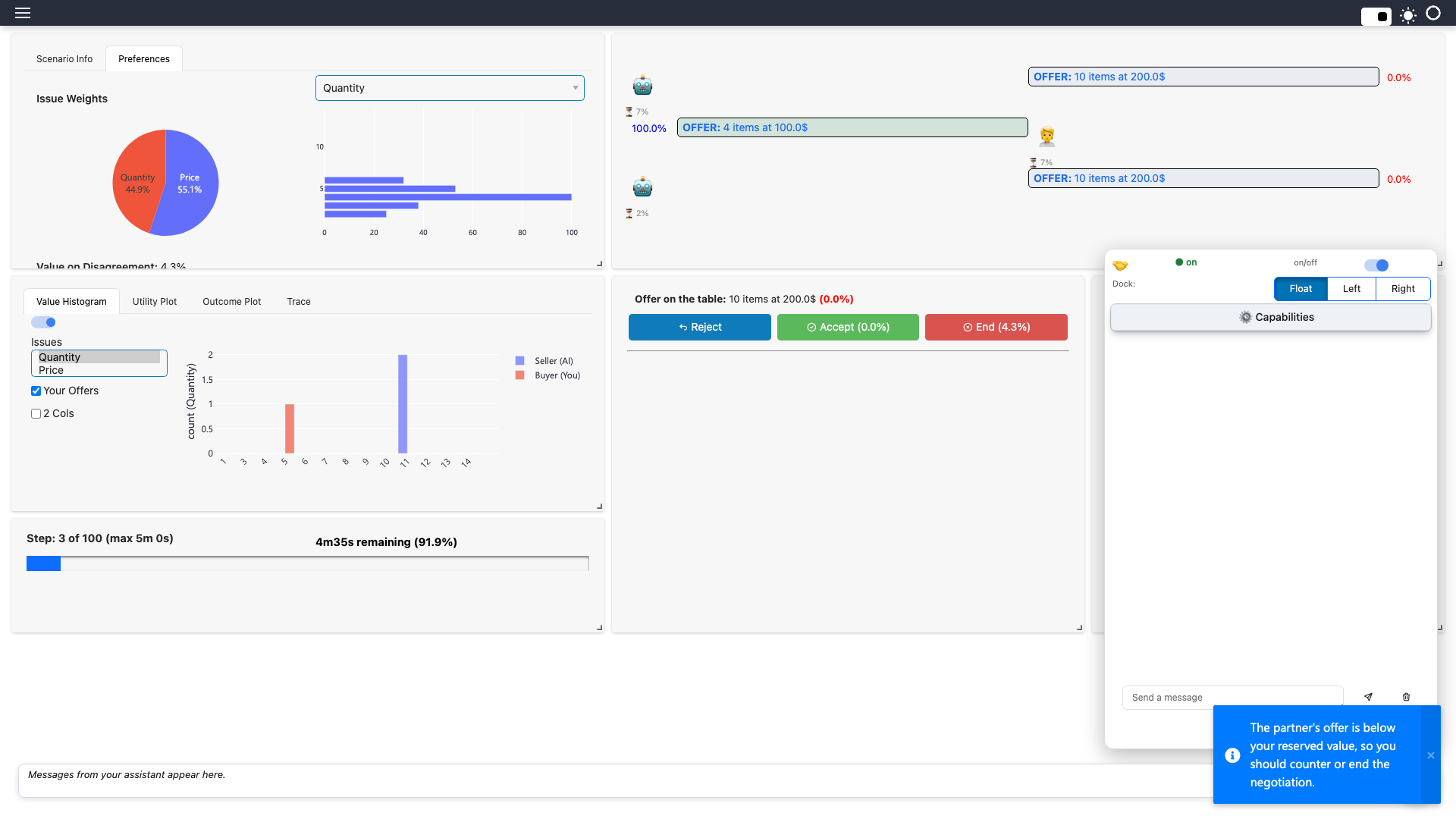
Make a counter-offer (Reject, then Send). When the partner answers, the coach speaks
up by itself, as a pop-up (proactive messages are delivered as a toast by default; the
participant can switch to the status box in the chat panel's settings):
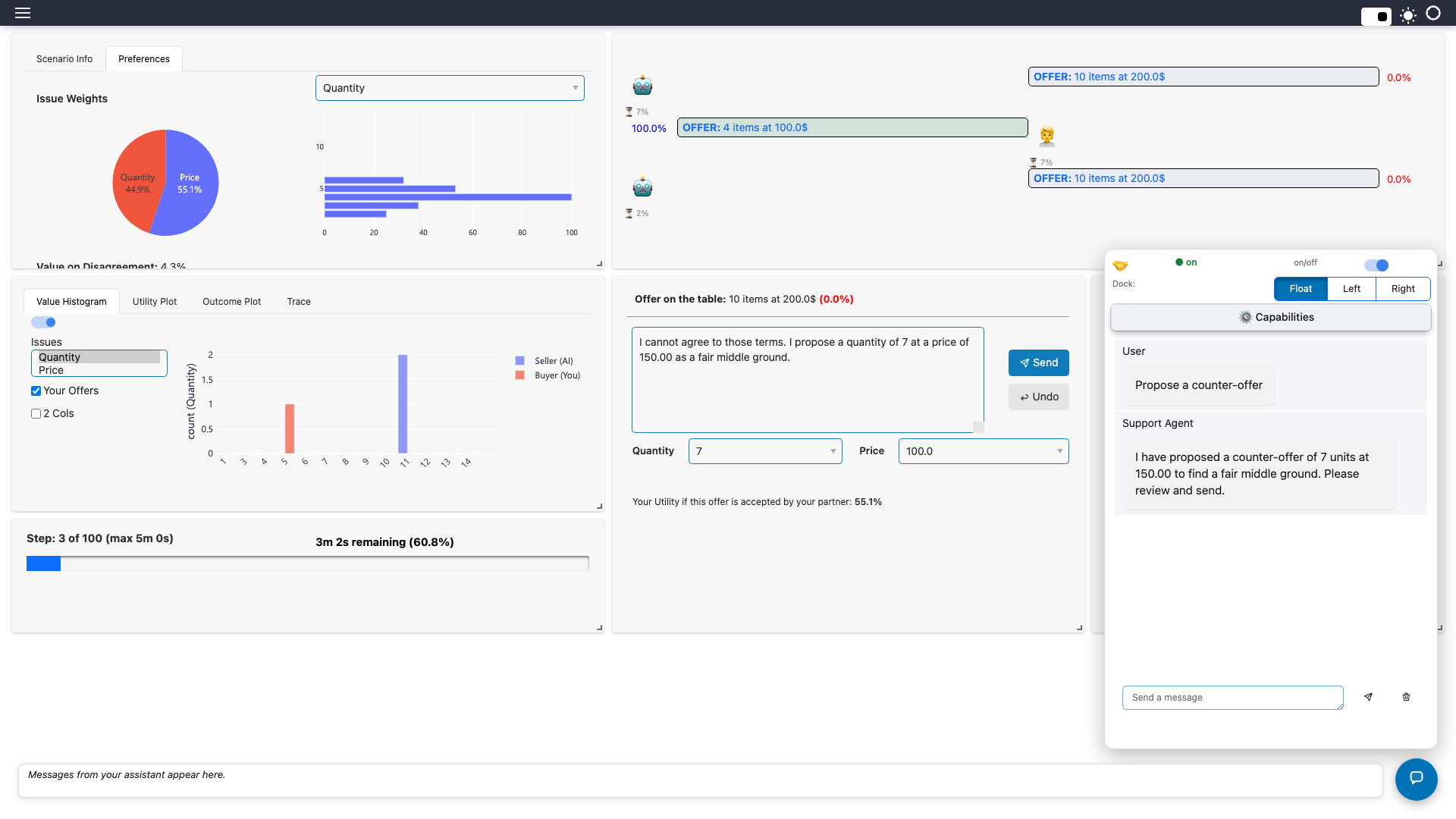
Now click Reject to open the offer editor and ask Propose a counter-offer. The coach
uses its tool, then fills in the offer fields and the message for you to review. It does
not send anything, because the settings only allow suggest; you press Send:
Models and tools
Proactive notes and offer filling depend on the model producing the right tool calls.
If a small model stays silent or ignores an instruction, try a stronger one through
provider / model.
Experiment
Open the ⚙️ Capabilities panel in the chat. You can switch capabilities off, or lower the autonomy — a participant can always make the agent less powerful, never more than the settings allow.
Level 6 (advanced): Control the interface
A support agent is not just a chat window. At any moment it can
| Ability | In code | LLM tool |
|---|---|---|
| Write in the chat | self.post(text) / self.message_user(text) |
(its normal reply), message_user |
| Pop up a notification (toast) | self.message_user(text, channel="toast") |
send_toast, message_user |
| Write to the always-visible status strip at the bottom | self.message_user(text, channel="board") |
show_on_board, message_user |
| Show or hide any tool tab, including the pinned ones | dispatcher.execute("set_tool_visible", ...) |
set_tool_visible |
| Switch a tool on or off | dispatcher.execute("set_tool_enabled", ...) |
set_tool_enabled |
| Reorder tools and move them between panes | dispatcher.execute("move_tool", ...) |
move_tool |
| Ask the user a question | self.ask_user(question, options) |
ask_user (Level 7) |
This level uses them without any LLM: the agent reveals the analysis tools step by step as the negotiation develops, and tells you what it did. The same calls are available to an LLM agent as tools, so you can let the model decide instead (Level 5) or script the policy yourself, as here. Scripted policies are predictable, free and easy to test.
from hani.support_agent.runtime import SupportAgent

ADVANCED = ["Value Histogram", "Utility Plot", "Outcome Plot", "Trace"]


class GuidedAgent(SupportAgent):
    def __init__(self, session_state, settings):
        super().__init__(session_state, settings)
        self._turns = 0

    def _tool(self, name: str, visible: bool) -> None:
        self.dispatcher.execute("set_tool_visible", {"name": name, "visible": visible})
        if visible:  # some plots are switched off by default: turn them on too
            self.dispatcher.execute("set_tool_enabled", {"name": name, "enabled": True})

    def on_event(self, event_name: str, nmi=None) -> None:
        if not self.user_enabled:
            return
        if event_name == "negotiation_started":
            for name in ADVANCED:  # start simple: hide everything advanced
                self._tool(name, False)
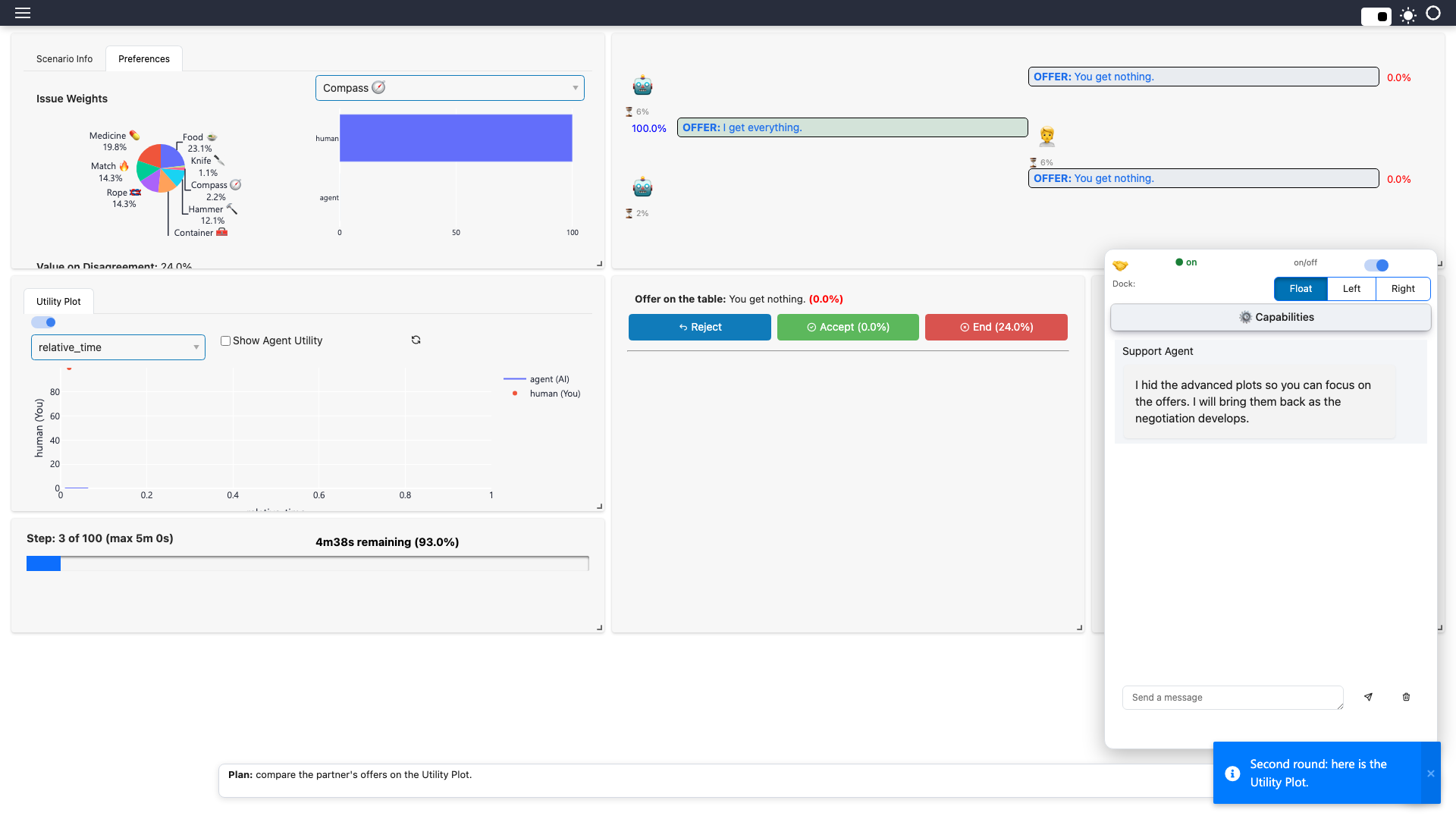
            self.message_user(
                "I hid the advanced plots so you can focus on the offers. "
                "I will bring them back as the negotiation develops."
            )
        elif event_name == "action_requested":
            self._turns += 1
            if self._turns == 2:
                self._tool("Utility Plot", True)
                self.message_user("Second round: here is the Utility Plot.", channel="toast")
                self.message_user("**Plan:** compare the partner's offers on the Utility Plot.", channel="board")
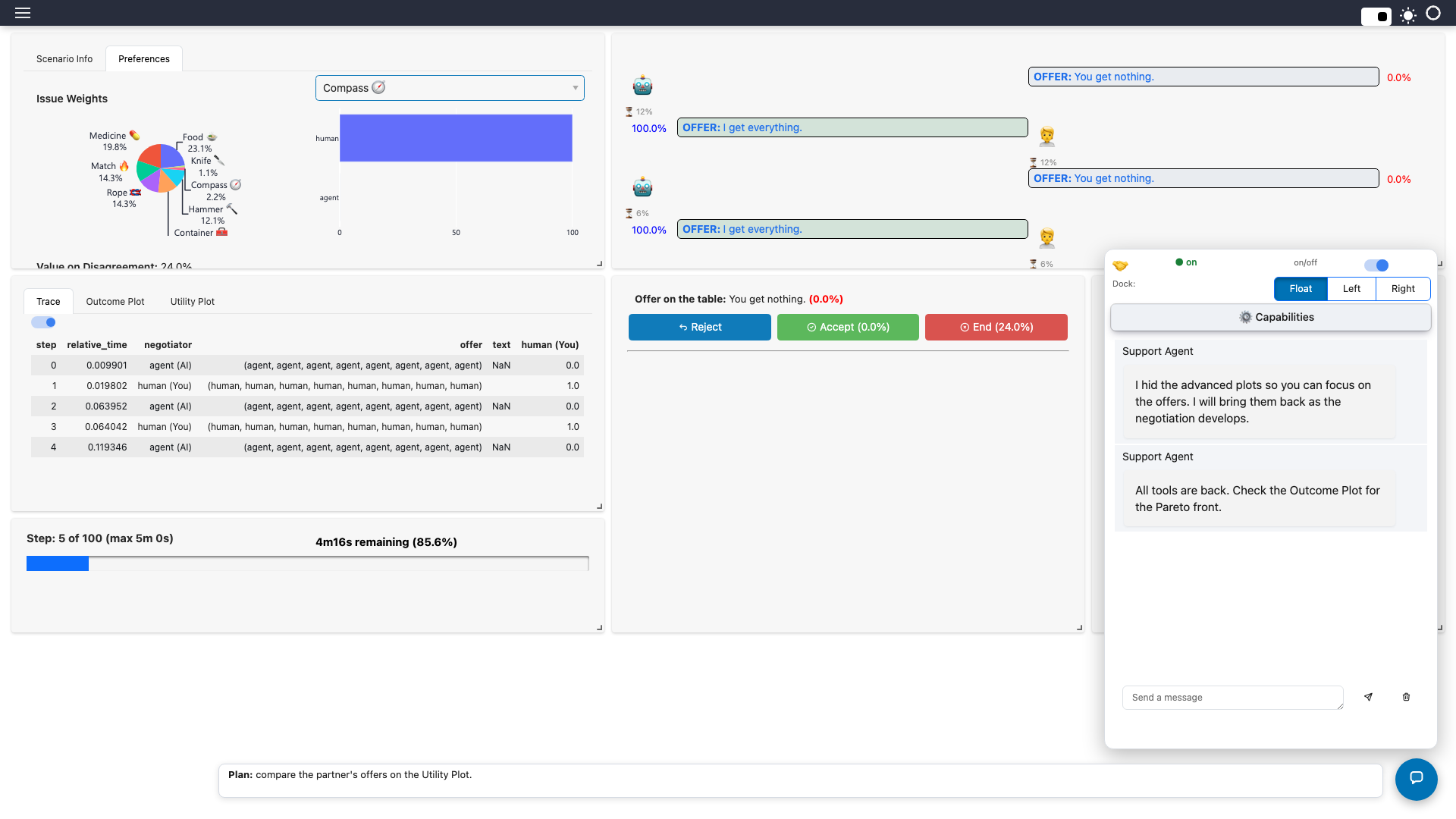
            if self._turns == 3:
                for name in ("Outcome Plot", "Trace"):
                    self._tool(name, True)
                self.message_user("All tools are back. Check the Outcome Plot for the Pareto front.")
on_event is called by HANI with "negotiation_started" when a negotiation begins and
"action_requested" every time it is the human's turn. Use
{ "agent_class": "level6_guided:GuidedAgent" }, restart and click Start. The agent has
hidden the four analysis tabs and explained why:
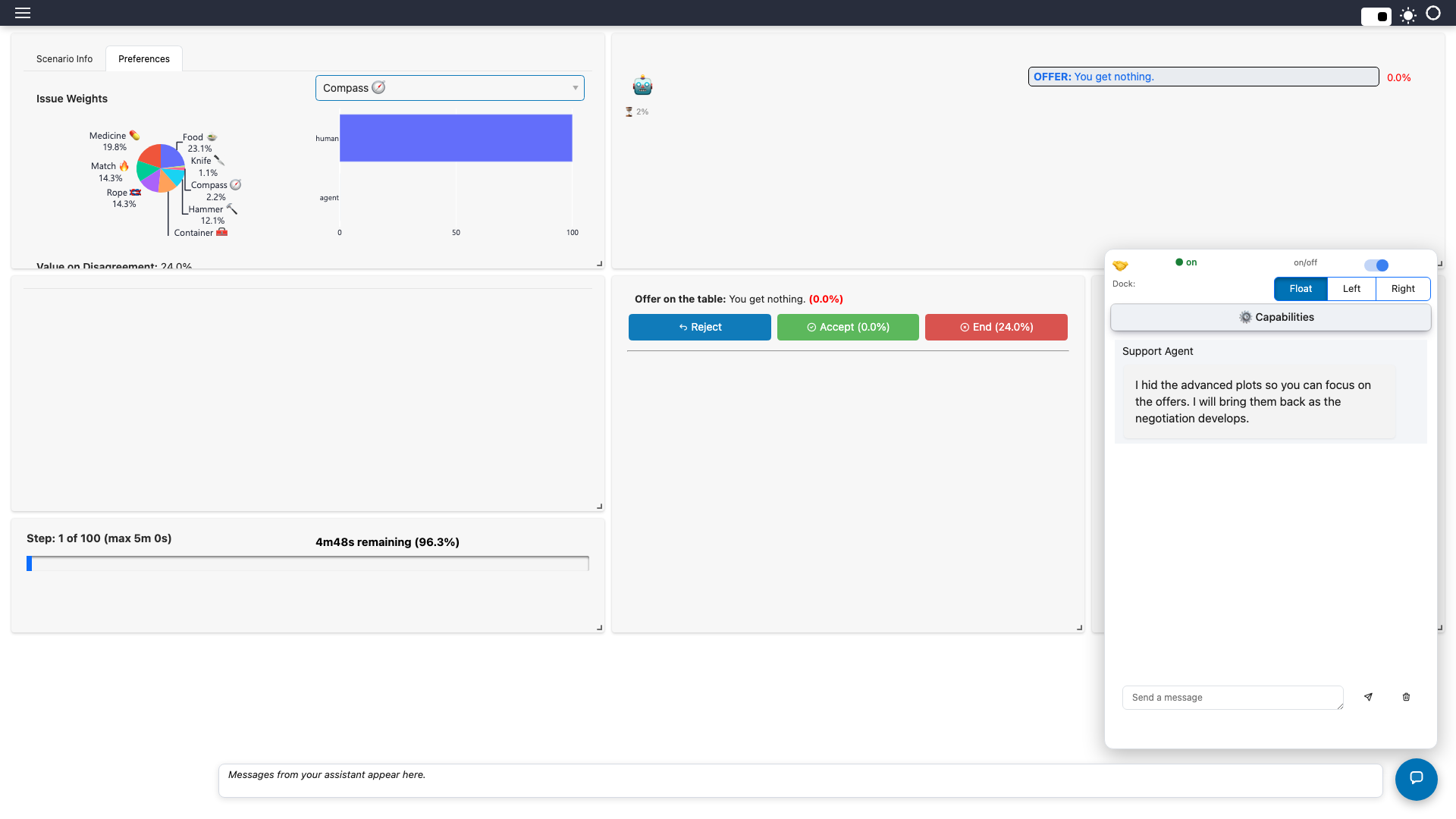
Make a counter-offer (Reject, then Send). On the second round the agent brings back the Utility Plot, pops up a notification and writes its plan on the status strip at the bottom of the window:
On the third round the rest of the tools return:
The human is never locked out
Everything the agent hides is restored automatically if the participant switches the
assistant off, and the agent can only do what the settings allow (tool_visibility,
tool_enable, tool_order, toast, chat capabilities).
Experiment
Change when each tool appears, hide the Preferences tab for a round, or have the agent write the partner's latest utility to the board on every turn.
Level 7 (advanced): Ask the user
Sometimes the agent needs a decision only the human can make. self.ask_user(question,
options) shows the question in the chat with answer buttons, waits for the answer
(a button click or a typed reply) and returns it. It returns None if nobody answers within
timeout seconds or while Autopilot is on (there is nobody to ask).
Here the coach asks, at the start, which style the user wants and then adapts: it tells the model, and from then on its advice follows that style.
from level5_deal_coach import DealCoach

STYLES = {
    "Cautious": "Prefer safe deals; recommend accepting any offer above the reserved value.",
    "Balanced": "Weigh risk and reward; accept good-enough offers late, counter early.",
    "Aggressive": "Push hard for the best deal; counter unless the offer is excellent.",
}


class AskingCoach(DealCoach):
    style = "Balanced"

    def on_event(self, event_name: str, nmi=None) -> None:
        if event_name == "negotiation_started" and self.user_enabled:
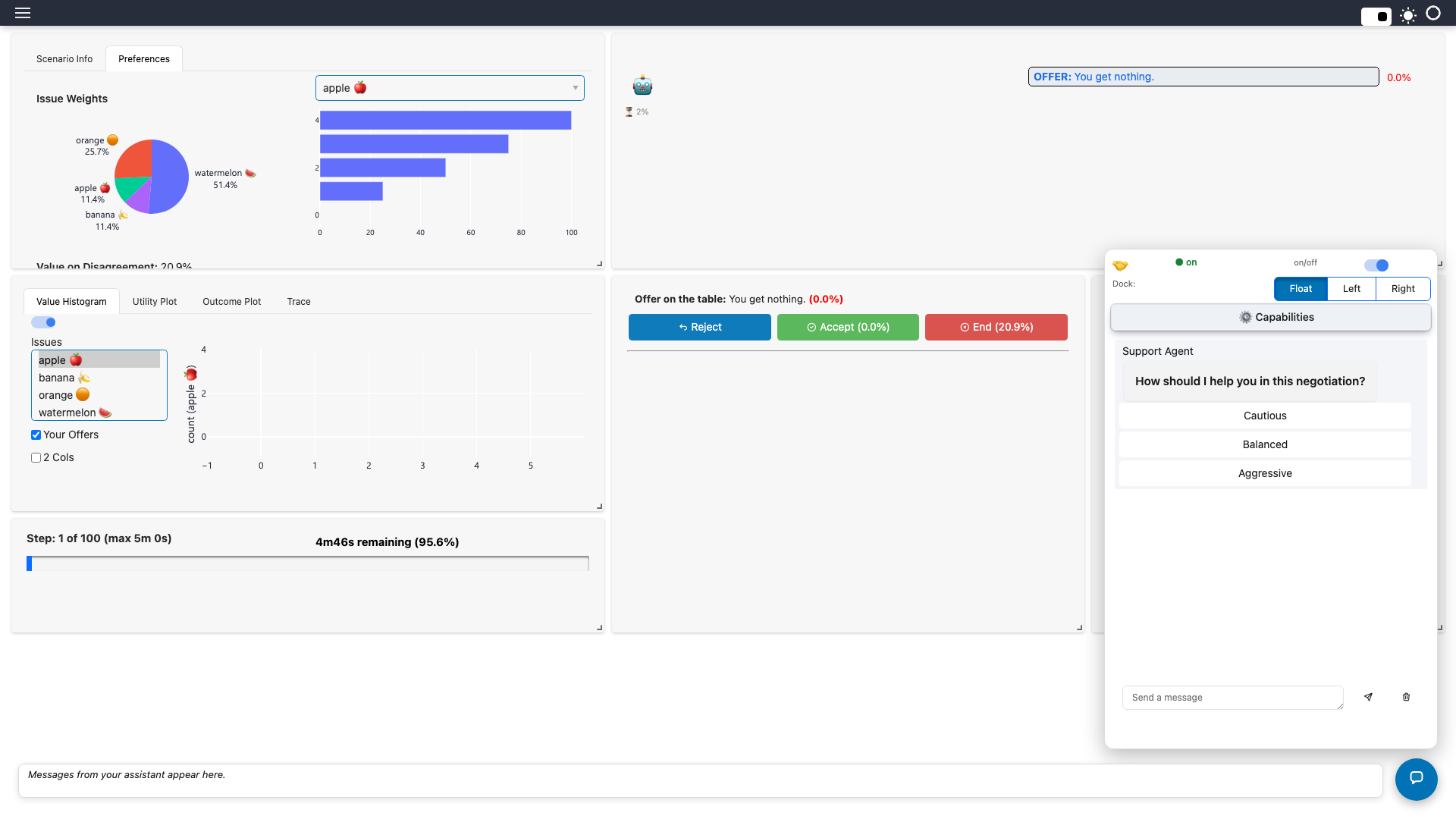
            answer = self.ask_user(
                "How should I help you in this negotiation?", list(STYLES)
            )
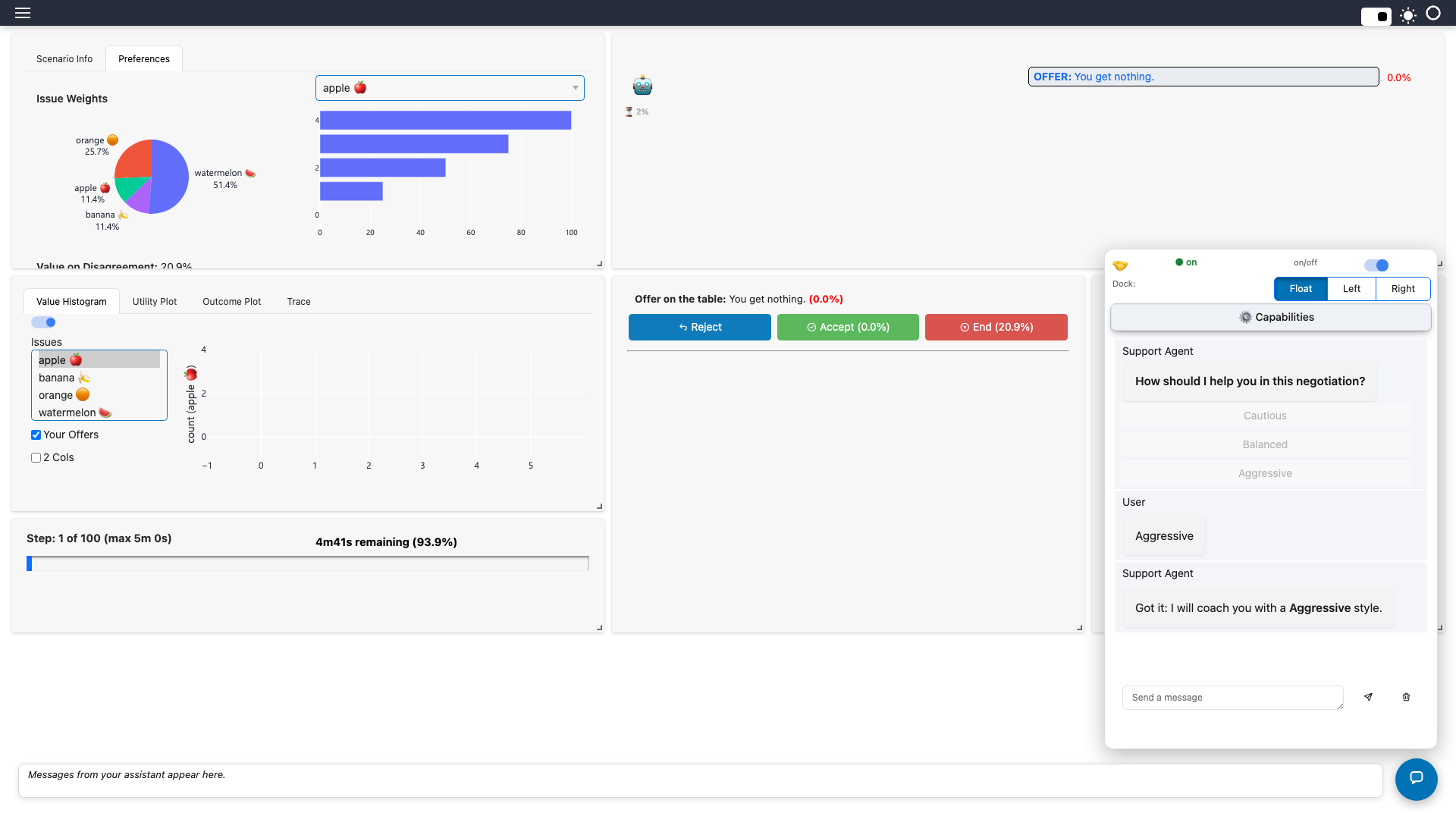
            if answer in STYLES:
                self.style = answer
            # Tell the model what the user chose (it is part of the conversation).
            self.messages.append(
                {"role": "user", "content": f"(system) The user wants a "
                 f"{self.style} approach. {STYLES[self.style]}"}
            )
            self.message_user(f"Got it: I will coach you with a **{self.style}** style.")
            return
        super().on_event(event_name, nmi)
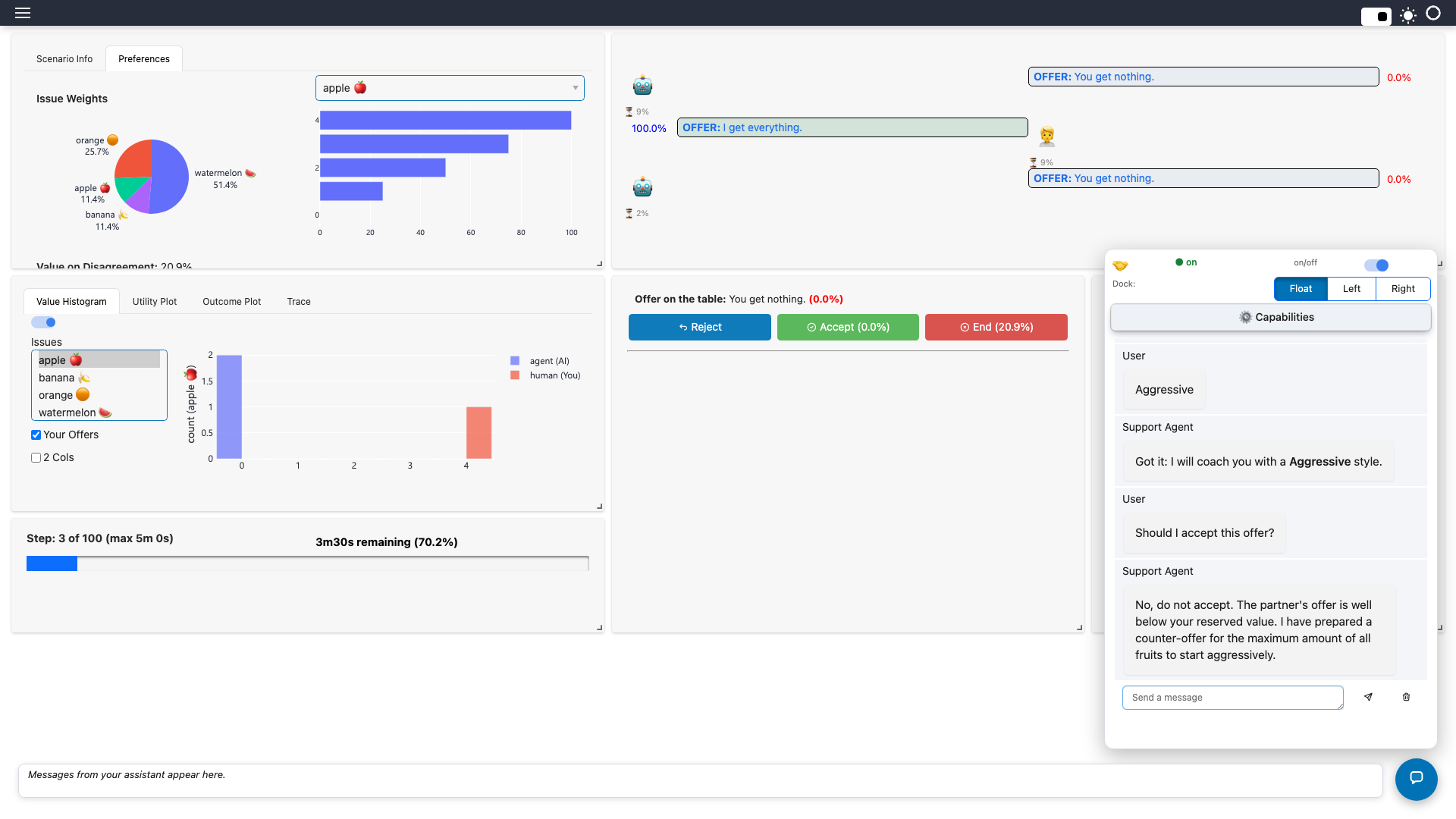
Set { "agent_class": "level7_asking:AskingCoach" } and start a negotiation. The question
appears with one button per option:
Click Aggressive (or type your own answer). The agent acknowledges and carries on:
Now make a counter-offer and ask Should I accept this offer?. The coach's advice follows
the style you picked (here it prepares an aggressive counter-offer instead of accepting):
ask_user blocks
Call it from a worker thread — on_event, handle_user_message or a tool handler —
never from code that runs on the interface thread. An LLM agent can also call it
itself: ask_user is one of its tools, so a prompt such as "if you need the user's
risk appetite, ask for it" is enough.
Experiment
Add a free-text question (ask_user("What is your walk-away price?") with no options),
or ask again after the second round and compare.
What you built
A support agent that
- runs inside HANI as an ordinary Python class,
- understands the live negotiation,
- converses through an LLM with a persona you control,
- makes its judgements in tested code via a tool,
- speaks up when it matters,
- controls the interface — tools, chat, notifications and the status strip — at any moment,
- asks the user when it needs a decision, and
- can only do what you permitted.
Troubleshooting
| Symptom | Cause / fix |
|---|---|
Chat answers like the default agent, and the server log says could not load custom agent_class |
The agent module is not importable by the server. Start HANI with PYTHONPATH pointing to the folder holding your file, and check the module:Class spelling. |
| Replies say Load a scenario… (Levels 2+) | No negotiation is running. Click Start first. |
Support agent error mentioning a connection |
Ollama is not running, or the model is not pulled (ollama pull qwen3:4b-instruct). |
| The model never calls the tool | Small models can be unreliable at tool calling. Try a stronger one via "provider" / "model" in the settings file. |
| Changes to your agent are not picked up | Restart hani guest; the class is loaded once per server. |
Where next
- Agent template — a download-and-edit starting point.
- Negotiation Support Agent — the full reference: every override, capability, autonomy level and the action API.
- Autopilot — let an agent make all decisions.
- Setting up Ollama and Agents & Opponent Pools.