Admin console
The admin console at /admin lets administrators watch live sessions, read results and event logs, manage users, and edit the settings files from the browser. Administrators also get extra controls on the negotiation page itself, described at the end of this page.
Access
Open http://localhost:5006/admin, or choose Administration in the account menu of the negotiation page. If you are not logged in, the console sends you to the login page and back. A logged-in user who is not an administrator sees "This page is for administrators."
A user is an administrator when any of these is true:
- the username is
admin; - the account has the role
admin(hani2 users add --admin, the Admin box when adding a user, or Make admin in the Users section); - the account's email is listed in
admin.emailsinenv.json(useful for OAuth sign-in).
See Authentication. The ?admin=1 query parameter on the negotiation page does not open the console; see the interface.
The console has a navigation column on the left (a scrolling bar at the top on narrow screens), a theme button and a Back to negotiating link. The current section is kept in the URL fragment, so /admin#results opens the results directly. Section fragments are overview, results, analytics, users, server, llm, agent, autopilot and texts.
How saving works
The settings sections (Server and studies, Language model, Support agent, Autopilot, Texts) load the current effective settings, let you edit them, and save with the Save button at the bottom. "Unsaved changes" appears next to it while you have edits.
Saving writes the file in the settings folder ($HANI2_HOME/settings, default ~/negmas/hani2/settings). It always writes there, even while an experiment is running. If the active experiment has its own copy of the same file, that copy takes precedence and your saved change has no visible effect until you edit the experiment's copy or remove it. See Configuration reference for the lookup order.
Saved settings apply to sessions created after saving. Sessions already open keep their settings.
Live sessions
A table of every session the server holds in memory, refreshed every five seconds. Above it, four figures: open sessions, sessions negotiating now, sessions recorded in the event log, and logged events.
| Column | Meaning |
|---|---|
user |
The user name (guest_<id> for playground visitors, prolific_<PID> for Prolific participants) |
mode |
main (/app) or guest (/play) |
phase |
idle, ready, starting, running, ended, questionnaire or finished |
round |
Negotiations started in this session |
scenario |
The loaded scenario |
partner |
The opponent type of the latest negotiation |
connections |
Open browser tabs |
idle |
Seconds since the last message from the browser |
The table is searchable. The server removes sessions that have no open tab, are not negotiating, and have been idle for more than six hours (it checks every ten minutes).
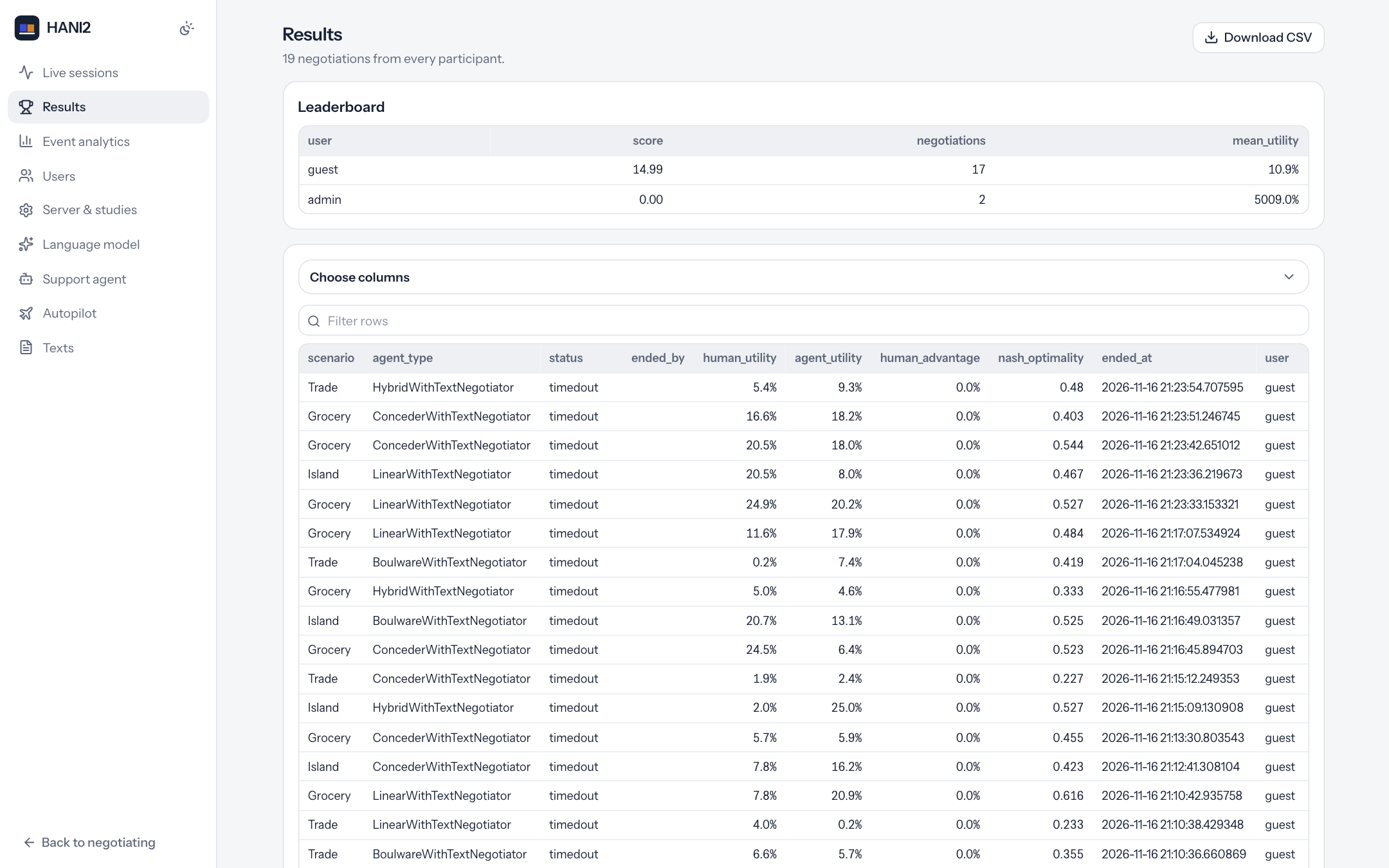
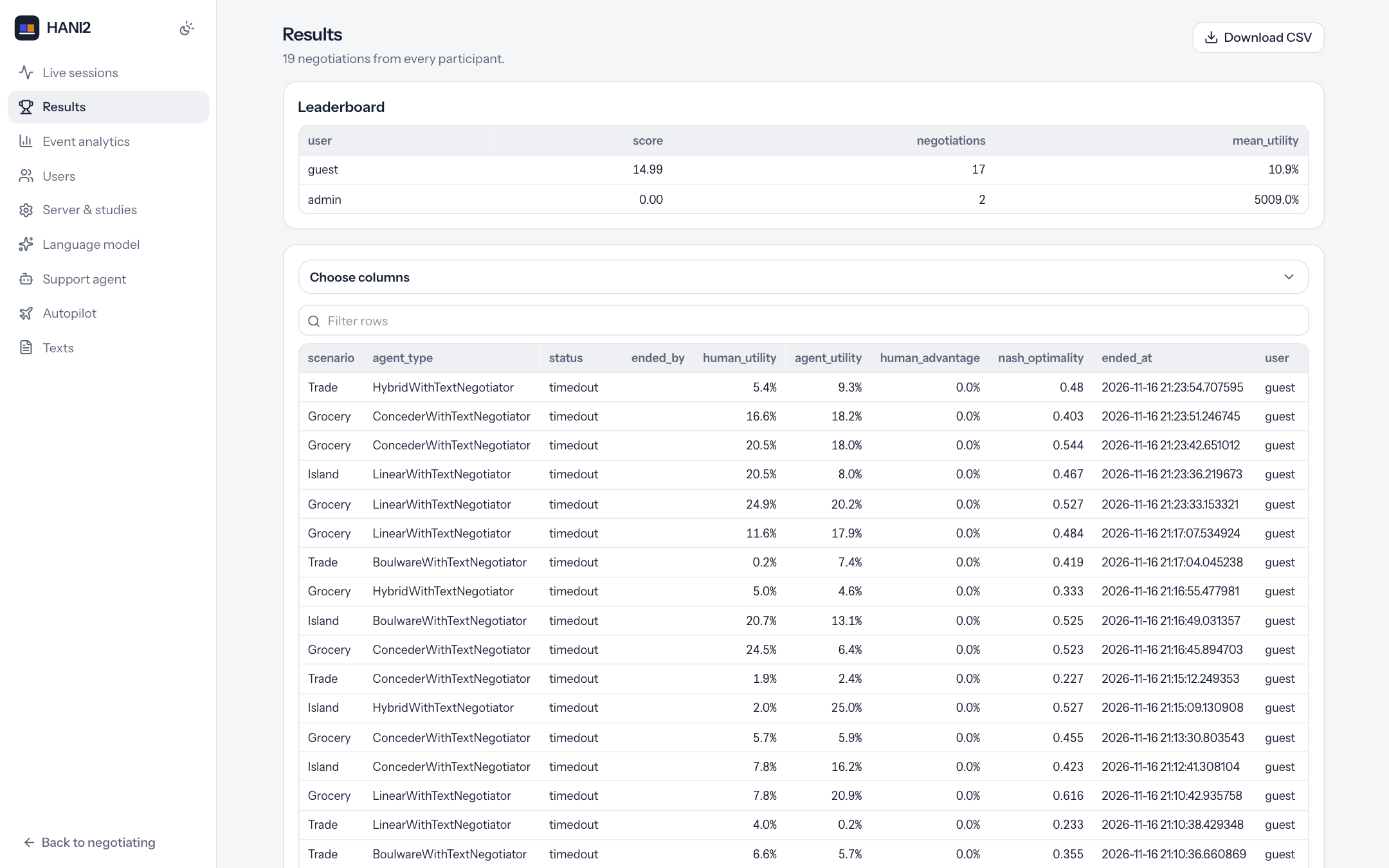
Results
Every finished negotiation from every participant, newest first, with:
- a Download CSV button (
/api/admin/results.csv, saved ashani2_results.csv); - a Leaderboard with
user,score,negotiationsandmean_utility, when there is anything to rank; - Choose columns: a collapsible picker of the columns to show. It starts with the default columns plus
user; - a searchable table. Utilities and the human advantage are shown as percentages.
Studies and results describes the results files and their columns.
Event analytics
Charts and a filterable log of the events the server records:
- Events by type: a bar chart of event counts.
- Activity over time (per hour).
- A filter row: user, event type, from date, until date, and Apply.
- A searchable event table (up to 2000 rows) with
timestamp,user,event_type,component,action,value,scenario_idandutility_value. - Recorded sessions: start and end time, user, mode, experiment and browser of the latest 200 sessions.
- Export CSV downloads every event (
/api/admin/events.csv, saved ashani2_events.csv).
See Studies and results for the event log and its event types.
Users
- Add user: username, password, optional email, and an Admin box. Users created here are marked as having consented.
- For every account: the name, an
adminbadge, the full name, email, OAuth provider and consent status, and the buttons Make admin / Remove admin, Set password, and delete. Deleting asks for confirmation and keeps the user's results.
The admin account cannot be demoted or deleted, and you cannot delete your own account. The same operations are available on the command line with hani2 users (see Command line).
Server and studies
Edits env.json.
| Field | Key |
|---|---|
| Title, Subtitle | title, subtitle |
| Sign-in: username and password, OAuth only, password and OAuth, or no sign-in | auth.mode (password, oauth, dual, none) |
| People can create accounts | auth.allow_registration |
| Require consent | auth.enforce_consent |
| Playground | playground.enabled |
| Admin emails | admin.emails |
| OAuth redirect base | oauth.redirect_uri |
| GitHub OAuth, Google OAuth: client id and secret | oauth.providers.github.key / .secret, oauth.providers.google.key / .secret |
Negotiation defaults:
| Field | Key |
|---|---|
| Rounds | negotiation.n_steps |
| Time limit (seconds), empty for none | negotiation.time_limit |
| Opponent agents, comma separated | opponents |
Under the partner pool, Available groups lists the opponent groups and how many negotiators each contains. See Opponents.
Tools: one row per registered tool with its description, its pane, when it appears, and whether it is admin-only. Untick Offered to add the tool to tools.disabled; untick Admins only to give an admin-only tool to every participant (tools.overrides.<name>.admin_only). Participants see opponent utilities sets tools.show_opponent_utility. Extra tools edits tools.extra (class paths such as my_pkg.tools:MyTool). Enlarged tools open as chooses whether a tool's enlarge button opens it in a large window, fills the screen, or is not offered (tools.maximize: window, fullscreen or off; see The interface). See Tools.
The OAuth rows edit the key and secret only. The enabled flag of a provider is not shown; a provider is used when it has both a key and a secret and is not explicitly disabled.
Language model
Edits llm_settings.json, used by the LLM offer tool, message writing, offer extraction and LLM partners. A banner at the top shows whether the model is configured ("Ready: provider / model") or which API key variable is missing.
Fields: provider (ollama, openai, anthropic, gemini, azure, groq, mistral, openrouter), model, Ollama address (ollama_base_url), API key variable (api_key_env, the name of the environment variable that holds the key), temperature and max tokens. When the settings contain extraction_prompt, generation_prompt or instruction_prompt, each is shown in a text area. See Language models.
Support agent
Edits support_agent_settings.json.
| Field | Key |
|---|---|
| Who gets the assistant: everyone, admins only, nobody | mode (on, auto, off) |
Agent class (module:Class, empty for the built-in agent) |
agent_class |
| Provider and model | provider, model |
| API base | api_base |
| API key variable | api_key_env |
| Temperature, max tokens, tool steps | temperature, max_tokens, max_tool_iterations |
| Highest autonomy: Suggest, Semi, Full | autonomy |
| Abilities granted | capabilities.<name> |
| Speaks up unprompted when a negotiation starts, it is the participant's turn, a negotiation ends | proactive.on_negotiation_started, proactive.on_action_requested, proactive.on_negotiation_ended |
| System prompt | system_prompt |
Participants can narrow these permissions in their assistant settings but never widen them. See Support agent.
Autopilot
Edits autopilot_settings.json.
| Field | Key |
|---|---|
| Autopilot allowed | allowed |
| Default driver | driver |
| Participants choose the driver: playground only, yes, no | user_can_choose (null, true, false) |
| Drivers offered (none ticked offers all) | allowed_drivers |
| Pause between steps (s) | step_delay |
Texts
Plain-text editors for three files, each with its own Save button:
- Welcome text:
announcements.md, shown before the first negotiation. - Consent form:
consent.md, shown on registration and on the consent page. - Scenario sets:
scenario_sets.yaml, the named lists of scenario types (see Scenario sets). - Custom order:
scenario_order.txt, one scenario type per line (theCustomset).
See Scenarios for the scenario order.
Admin controls on the negotiation page
An administrator negotiating on /app (or on /play while logged in) gets more than a participant:
- The Admin badge and the partner's name in the header, and no time limit by default (
time_limitstarts as none for admins). - The Scenario picker before each negotiation: a scenario type and a scenario name, then Load.
- The Opponent for the next negotiation picker, with suggestions from every opponent group. Leave it empty for a random partner from the pool.
- In the counter-offer editor: Text only, Offer from message and Write message.
- Admin-only tools in the tool panes.
- Extra sections in the settings drawer.
The opponent picker and the partner's name are also available in admin mode (?admin=1) without an admin account. The other controls are not.
The admin settings drawer
The gear button opens the settings drawer. Below the display settings, administrators see four more sections. They change the current session only; most take effect at the next negotiation. "Server-wide defaults are in Administration."
| Section | Setting | Key | Default |
|---|---|---|---|
| Timing | Rounds | n_steps |
100 |
| Time limit (s) | time_limit |
300 (none for admins) | |
| Time per step (s) | step_time_limit |
none | |
| Negotiator time (s) | negotiator_time_limit |
none | |
| End probability per step | pend |
0 | |
| End probability per second | pend_per_second |
0 | |
| Negotiation rules | An empty offer ends the negotiation | end_on_no_response |
off |
| Allow messages without an offer | allow_text_only_offers |
on | |
| Show messages from the AI partner | allow_text_agent |
on | |
| Let the participant write messages | allow_text_human |
on | |
| Text-only mode | text_only_mode |
off | |
| Write a message when none is given (uses the LLM) | auto_generate |
off | |
| Start the editor from my last offer | init_with_last |
on | |
| Otherwise start from my best outcome | init_with_best |
on | |
| Scenarios and partners | Use saved scenario pools (off: generate a fresh scenario each time) | load_existing |
on (off in the playground) |
| Follow the scenario order | predefined_order |
on (off in the playground) | |
| Participants may choose the scenario | allow_scenario_selection |
off | |
| Show the opponent agent's type | show_opponent_type |
off (on for admins) | |
| Opponent agents (comma separated) | opponent_types |
empty | |
| Tools | Tools can be switched on and off | allow_tool_switch |
on |
| Tools can be moved between panes | allow_moving_tools |
on |
Three further per-session keys exist but have no control in the drawer: human_index (which negotiator seat the participant takes, default 1), auto_extract (fill the offer from the message with the LLM before sending, default off) and generate_on_failure (generate a scenario when loading one fails, default on).
Every key in this table can also be given a server-wide default under "negotiation" in env.json. The bundled env.json sets n_steps to 100 and time_limit to 300. See Configuration reference.