Build a support agent
This tutorial builds a negotiation support agent in ten small steps. You start with an agent that echoes what the participant types and finish with one that points at the interface, rearranges it and builds its own interactive panels. Most levels need no language model at all; levels 3, 4, 5 and 7 use one.
| Level | You build | Needs an LLM |
|---|---|---|
| 0 | Nothing yet: install HANI2 and meet the default agent | yes, to chat with the default agent |
| 1 | An echo agent | no |
| 2 | Rules that read the live negotiation | no |
| 3 | An LLM coach with your own persona | yes |
| 4 | A custom function the model can call | yes |
| 5 | A proactive deal coach | yes |
| 6 | An agent that controls the tools | no |
| 7 | An agent that asks the participant a question | yes, for the coaching |
| 8 | Highlights and notes on the interface | no |
| 9 | Layout changes and a custom interactive panel | no |
Every level is a real file in examples/support_agent_tutorial in the source repository, and every one is covered by the test suite. The Support agent guide is the reference for everything used here.
Level 0: set up
Install HANI2 and create the settings folder:
hani2 setup creates ~/negmas/hani2/settings with default settings, two accounts and sample scenarios. Set HANI2_HOME before running it to use another folder.
Get the example files from the source repository:
Start the server and open the playground, which needs no login:
Your browser opens http://localhost:5006/play. Press Start to begin a negotiation, then press Assistant in the header to open the assistant dock. This is the default agent.
The default agent needs a language model. Out of the box it uses qwen3:4b-instruct through a local Ollama server:
With Ollama running, ask the assistant "What do you think of this offer?". It answers with the live negotiation state in front of it. Without a model you see a "Support agent error" message in the chat; that is fine for levels 1, 2, 6, 8 and 9. To use a hosted model instead, see Language models.
How to run each level
Each level is a class in a module in this folder. To run one:
-
Open
~/negmas/hani2/settings/support_agent_settings.jsonand setagent_classto the level'smodule:Class, for example:The file is merged over the defaults, so you may keep the other keys
hani2 setupwrote or delete them. -
From inside
examples/support_agent_tutorial, start the server with this folder on Python's path: -
Press Start, then open the Assistant.
Restart the server after every change to the settings or the code. Sessions and their agents live in memory and are created once per session, so a running server keeps using the agent it already built.
Levels 4, 5 and 7 import from earlier levels (from level3_llm_coach import COACH_PROMPT), so keep all the files together in the folder on PYTHONPATH.
Level 1: echo
The smallest possible agent overrides one method. handle_user_message runs every time the participant sends a chat message; post writes a message into the chat.
"""Level 1 - the simplest possible Support Agent (no LLM at all)."""

from hani2.support_agent.runtime import SupportAgent


class HelloAgent(SupportAgent):
    def handle_user_message(self, text: str) -> None:
        self.post(f"Hello! You said: {text}")
Run it with "agent_class": "level1_hello:HelloAgent", open the assistant and type "hi". The agent answers "Hello! You said: hi".
handle_user_message replaces the whole chat turn, so this agent never calls a language model. It runs in a worker thread, so it may take as long as it needs without freezing the page.
Try this: add name = "Echo" as a class attribute and watch the dock header and the chat change. Then switch the assistant off with the switch in the dock header: the message box is disabled, and the session never calls your method while the agent is off.
Level 2: rules that read the negotiation
Now the agent looks at the negotiation. session_state["actions"]["context"] returns a snapshot with the issues, the partner's offer and its utility for the participant, the reserved value, the draft offer and the recent history.
"""Level 2 - an agent that reads the live negotiation (still no LLM)."""

from hani2.support_agent.runtime import SupportAgent


class RulesAgent(SupportAgent):
    def handle_user_message(self, text: str) -> None:
        actions = self.session_state.get("actions")
        if not actions:  # no negotiation has been loaded yet
            self.post("Load a scenario and start a negotiation first.")
            return

        # We are on a worker thread: read UI-owned state via run_on_doc.
        ctx = self.run_on_doc(actions["context"])

        offer = ctx["partner_offer"]
        if offer is None:
            self.post("Your partner has not made an offer yet.")
            return

        utility = ctx["partner_offer_utility"]
        reserved = ctx["reserved_value"]
        if utility < reserved:
            advice = "That is **worse than walking away** - do not accept it."
        else:
            advice = "That beats your reserved value - it could be acceptable."
        offer_text = ", ".join(f"{issue}: {value}" for issue, value in offer.items())
        self.post(
            f"Partner offer: {offer_text}\n\n"
            f"Worth **{utility:.0%}** to you (reserved value {reserved:.0%}). {advice}"
        )
Run it with "agent_class": "level2_rules:RulesAgent". Start a negotiation, wait for the partner's first offer and ask anything. The agent replies with the offer, what it is worth to you and a one-line verdict.
Two things to note:
- The agent reads state through
run_on_doc. It runs the function under the session lock, so the snapshot is consistent even while the partner is moving.self.context()is a shortcut for the same call. - Utilities and the reserved value are numbers between 0 and 1 for the participant only.
Try this: add a line that lists the partner's last three offers from ctx["history"] (entries with by == "partner"), with their utilities.
Level 3: an LLM coach
The built-in agent already runs a language model with function calling. To give it your own persona, override build_system_prompt.
"""Level 3 - give the agent a brain: an LLM with your own persona."""

from hani2.support_agent.runtime import SupportAgent

COACH_PROMPT = """You are a calm, concise negotiation coach.
You always receive the live negotiation state with the user's message.
Rules:
- Answer in at most three short sentences.
- Compare the partner's offer with the user's reserved value before advising.
- Never tell the user to accept an offer worth less than their reserved value.
- Never reveal the user's utility numbers to the partner."""


class CoachAgent(SupportAgent):
    def build_system_prompt(self) -> str:
        return COACH_PROMPT
Set the model in the same settings file:
{
  "agent_class": "level3_llm_coach:CoachAgent",
  "provider": "ollama",
  "model": "qwen3:4b-instruct"
}
For a hosted model, set provider, model and api_key_env (the name of the environment variable that holds your key), for example "provider": "openai", "model": "gpt-4o-mini", "api_key_env": "OPENAI_API_KEY".
Each chat message reaches the model with the current negotiation state attached as JSON, so the prompt does not have to ask for it. The model can also call every function the admin granted: fill the offer, highlight a button, show a panel and so on.
Try this: ask "Fill in a counter-offer for me". The coach calls set_offer and the fields change. Then set "autonomy": "suggest" and ask it to accept: instead of accepting, it highlights the Accept button. Set "capabilities": {"accept": false} and the model no longer sees the accept function at all.
Level 4: a function of your own
Language models are poor at arithmetic. Do the numbers in code and let the model explain them. A ToolDispatcher subclass registers new functions in register_extra_tools; the agent uses it through dispatcher_class.
"""Level 4 - give the agent a tool of its own: a deterministic offer assessment."""

from hani2.support_agent.runtime import SupportAgent
from hani2.support_agent.tools import ToolDispatcher, make_function_schema

from level3_llm_coach import COACH_PROMPT


class CoachDispatcher(ToolDispatcher):
    def register_extra_tools(self) -> None:
        self.register(
            "assess_partner_offer",
            self._assess,
            lambda: make_function_schema(
                "assess_partner_offer",
                "Judge the partner's current offer against the user's reserved "
                "value and a target that relaxes as the deadline nears. Call this "
                "before recommending accept / counter / end.",
                {},
                [],
            ),
            capability=None,  # always available (it only reads state)
        )

    def _assess(self, args: dict) -> dict:
        ctx = self.runtime.run_on_doc(self.ss["actions"]["context"])
        utility = ctx["partner_offer_utility"]
        if utility is None:
            return {"ok": False, "error": "the partner has not made an offer yet"}
        reserved = ctx["reserved_value"]
        time = ctx["relative_time"] or 0.0
        target = max(reserved, 0.9 - 0.4 * time)  # 90% at the start, 50% at the end
        if utility < reserved:
            verdict = "end_or_counter"  # worse than walking away
        elif utility >= target:
            verdict = "accept"
        else:
            verdict = "counter"
        return {
            "ok": True,
            "verdict": verdict,
            "offer_utility": round(utility, 3),
            "reserved_value": round(reserved, 3),
            "target_now": round(target, 3),
        }


class ToolCoachAgent(SupportAgent):
    dispatcher_class = CoachDispatcher

    def build_system_prompt(self) -> str:
        return COACH_PROMPT + "\nUse assess_partner_offer to judge any offer."
Run it with "agent_class": "level4_tools:ToolCoachAgent". Ask "Should I accept?" The model calls assess_partner_offer, receives a verdict with the offer's utility, the reserved value and a target that relaxes over time, and explains it.
register takes the function name, a handler that receives the argument dictionary and returns a JSON-serialisable dictionary, a callable returning the schema (make_function_schema builds it) and a capability. capability=None makes the function always available; pass a Capability to tie it to one the admin can grant or the participant can switch off.
Try this: add an issue argument ({"issue": {"type": "string"}}) and return the partner's value on that issue, then ask the coach about a single issue.
Level 5: a proactive deal coach
So far the agent only speaks when spoken to. proactive_note lets it speak up on negotiation events. Return a short instruction for the events you care about and None for the rest.
"""Level 5 - the finished Deal Coach: proactive, tool-using, and safe."""

from hani2.support_agent.runtime import SupportAgent

from level4_tools import CoachDispatcher
from level3_llm_coach import COACH_PROMPT


class DealCoach(SupportAgent):
    dispatcher_class = CoachDispatcher

    def build_system_prompt(self) -> str:
        return (
            COACH_PROMPT
            + "\nUse assess_partner_offer to judge any offer."
            + "\nWhen you propose a counter-offer, fill it in with set_offer and "
            "set_message_text so the user can review it before sending."
        )

    def proactive_note(self, event_name: str) -> str | None:
        if event_name == "action_requested":
            return (
                "(system) It is the user's turn. Call assess_partner_offer, then "
                "give ONE sentence: accept, counter, or end - and why."
            )
        return None  # stay silent on every other event
Proactive turns are off by default. Turn on the event in the settings:
Now, on every one of your turns, the coach assesses the partner's offer and gives a one-sentence recommendation. By default it arrives as a notification. In the assistant settings (the sliders icon in the dock header), Unprompted messages appear as switches it to the status board or the chat.
Try this: also enable on_negotiation_ended and return a debrief instruction for negotiation_ended. Then set "autonomy": "suggest" and watch the coach fill the offer and highlight Send without sending.
Level 6: controlling the tools
Agents can rearrange the participant's analysis tools. This one starts simple, hiding the advanced plots, and brings them back as the negotiation develops. It needs no model: it calls the same functions an LLM would, through self.dispatcher.execute, so its actions are logged as the agent's.
"""Level 6 - an agent that controls the interface and speaks up at any moment.

No LLM needed: the agent reveals the analysis tools step by step and tells the
user what it did, using the same tools an LLM would call.
"""

from hani2.support_agent.runtime import SupportAgent

ADVANCED = ["Value Histogram", "Utility Plot", "Outcome Plot", "Trace"]


class GuidedAgent(SupportAgent):
    def __init__(self, session_state, settings):
        super().__init__(session_state, settings)
        self._turns = 0

    def _tool(self, name: str, visible: bool) -> None:
        self.dispatcher.execute("set_tool_visible", {"name": name, "visible": visible})
        if visible:  # some plots are switched off by default: turn them on too
            self.dispatcher.execute("set_tool_enabled", {"name": name, "enabled": True})

    def on_event(self, event_name: str, nmi=None) -> None:
        if not self.user_enabled:
            return
        if event_name == "negotiation_started":
            for name in ADVANCED:  # start simple: hide everything advanced
                self._tool(name, False)
            self.message_user(
                "I hid the advanced plots so you can focus on the offers. "
                "I will bring them back as the negotiation develops."
            )
        elif event_name == "action_requested":
            self._turns += 1
            if self._turns == 2:
                self._tool("Utility Plot", True)
                self.message_user("Second round: here is the Utility Plot.", channel="toast")
                self.message_user("**Plan:** compare the partner's offers on the Utility Plot.", channel="board")
            if self._turns == 3:
                for name in ("Outcome Plot", "Trace"):
                    self._tool(name, True)
                self.message_user("All tools are back. Check the Outcome Plot for the Pareto front.")
Run it with "agent_class": "level6_guided:GuidedAgent". When you press Start, the Value Histogram, Utility Plot, Outcome Plot and Trace tabs disappear and the agent explains why in the chat. On your second turn the Utility Plot returns with a notification and a plan on the status board; on the third, everything is back.
on_event receives negotiation_started, action_requested and negotiation_ended. Overriding it replaces the default behaviour (proactive turns and autopilot), which is what this agent wants. message_user(text, channel=...) sends to chat, toast or board.
Try this: use move_tool to move the Utility Plot into the side pane on the second turn: self.dispatcher.execute("move_tool", {"name": "Utility Plot", "pane": "side"}).
Level 7: asking the participant
ask_user(question, options) posts a question in the chat with answer buttons and waits for the answer. The participant can press a button or type a reply. The call blocks the agent's worker thread, not the interface.
"""Level 7 - an agent that asks the user, then adapts.

The answer to ask_user() steers a deterministic part (what to show) and is also
handed to the LLM, so the coach talks in the style the user picked.
"""

from level5_deal_coach import DealCoach

STYLES = {
    "Cautious": "Prefer safe deals; recommend accepting any offer above the reserved value.",
    "Balanced": "Weigh risk and reward; accept good-enough offers late, counter early.",
    "Aggressive": "Push hard for the best deal; counter unless the offer is excellent.",
}


class AskingCoach(DealCoach):
    style = "Balanced"

    def on_event(self, event_name: str, nmi=None) -> None:
        if event_name == "negotiation_started" and self.user_enabled:
            answer = self.ask_user(
                "How should I help you in this negotiation?", list(STYLES)
            )
            if answer in STYLES:
                self.style = answer
            # Tell the model what the user chose (it is part of the conversation).
            self.messages.append(
                {"role": "user", "content": f"(system) The user wants a "
                 f"{self.style} approach. {STYLES[self.style]}"}
            )
            self.message_user(f"Got it: I will coach you with a **{self.style}** style.")
            return
        super().on_event(event_name, nmi)
Run it with "agent_class": "level7_asking:AskingCoach" and keep "proactive": {"on_action_requested": true}. When you press Start, the assistant dock opens with the question "How should I help you in this negotiation?" and three buttons. The answer sets the coaching style and is added to the model conversation, so later advice follows it. Every other event goes to the level 5 coach through super().on_event(...).
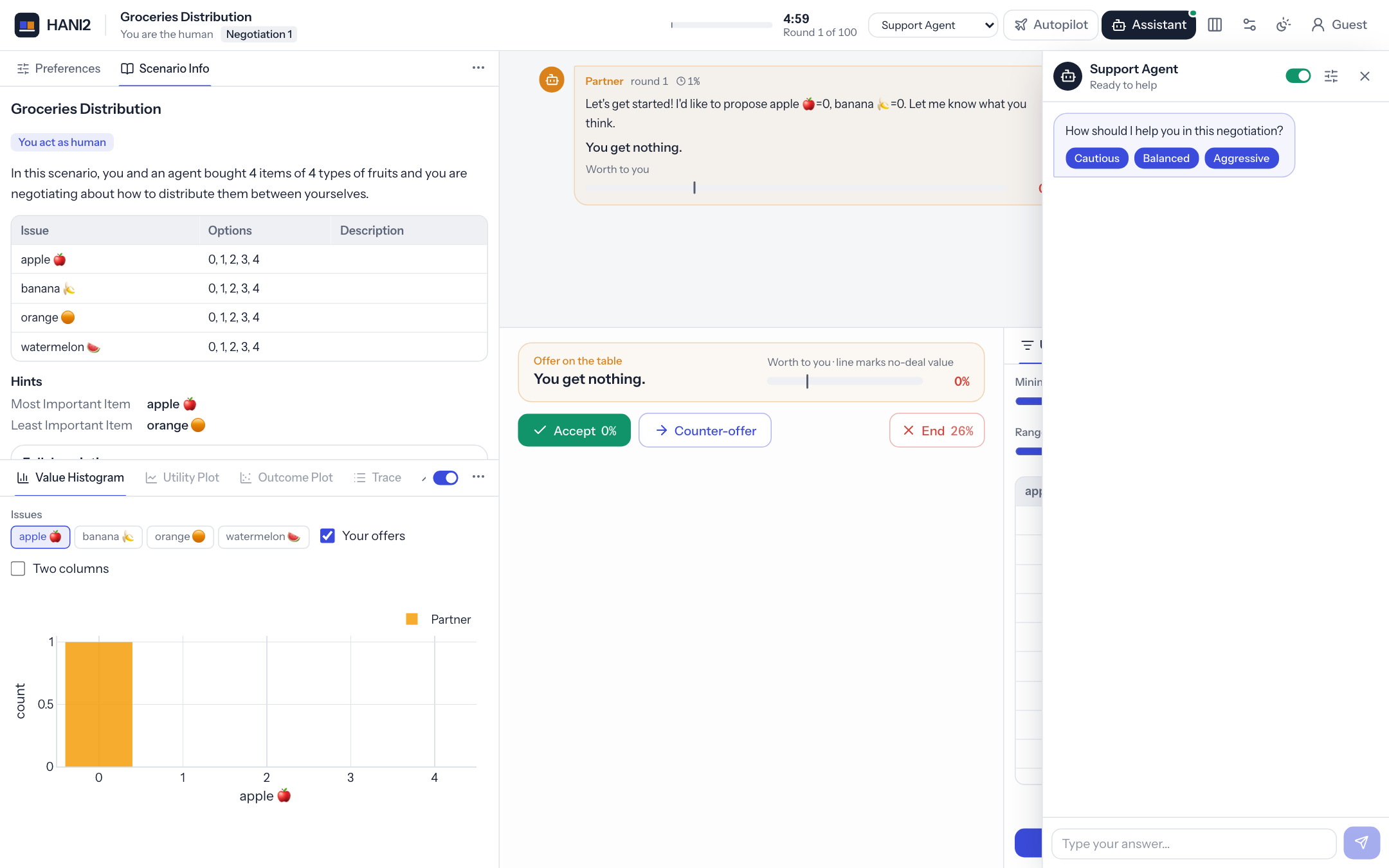
ask_user returns None when the participant does not answer within the timeout (180 seconds by default), under autopilot, or while another question is pending. Always handle None.
Try this: ask a follow-up question when the negotiation ends ("Was my advice useful?" with "Yes" and "No") and log the answer with self.post.
Level 8: highlights and notes
The agent can point at the interface. highlight(target, message, style=...) spotlights an element with a short callout; annotate(target, text, kind=...) attaches a note that stays until removed. Targets include the buttons (accept, reject, end, send), partner_offer, offer, history, timer, issue:<name> and tool:<name>.
"""Level 8 - point at the interface: highlights and notes (no LLM).

On every turn the agent reads the negotiation, then
* annotates each issue the partner just moved on ("Partner conceded here"),
* spotlights the button it recommends, with a one-line reason.
"""

from hani2.support_agent.runtime import SupportAgent


class SpotlightAgent(SupportAgent):
    def __init__(self, session_state, settings):
        super().__init__(session_state, settings)
        self._last_partner_offer = None

    def on_event(self, event_name: str, nmi=None) -> None:
        if not self.user_enabled or event_name != "action_requested":
            return
        ctx = self.context()
        offer = ctx["partner_offer"]
        if offer is None:
            return

        # 1. Notes on the issues the partner changed since its last offer.
        previous = self._last_partner_offer or {}
        for issue, value in offer.items():
            if issue in previous and previous[issue] != value:
                self.annotate(f"issue:{issue}", f"Partner moved: {previous[issue]} → {value}", kind="tip")
            else:
                self.annotate(f"issue:{issue}", None)  # remove an old note
        self._last_partner_offer = offer

        # 2. Spotlight the recommended button.
        utility, reserved = ctx["partner_offer_utility"], ctx["reserved_value"]
        if utility < reserved:
            self.highlight("reject", "Worse than no deal. Make a counter-offer.")
        elif utility >= max(reserved, 0.9 - 0.4 * (ctx["relative_time"] or 0)):
            self.highlight("accept", f"Worth {utility:.0%} to you. Consider accepting.", style="glow")
        else:
            self.highlight("partner_offer", "Acceptable but improvable. Counter a little higher.")
Run it with "agent_class": "level8_spotlight:SpotlightAgent". On each of your turns the agent marks every issue the partner moved on with a "Partner moved" note, and spotlights the button it recommends with a one-line reason: Reject when the offer is worse than no deal, Accept (with a glow) when it is good enough for the time left, otherwise the partner's offer.
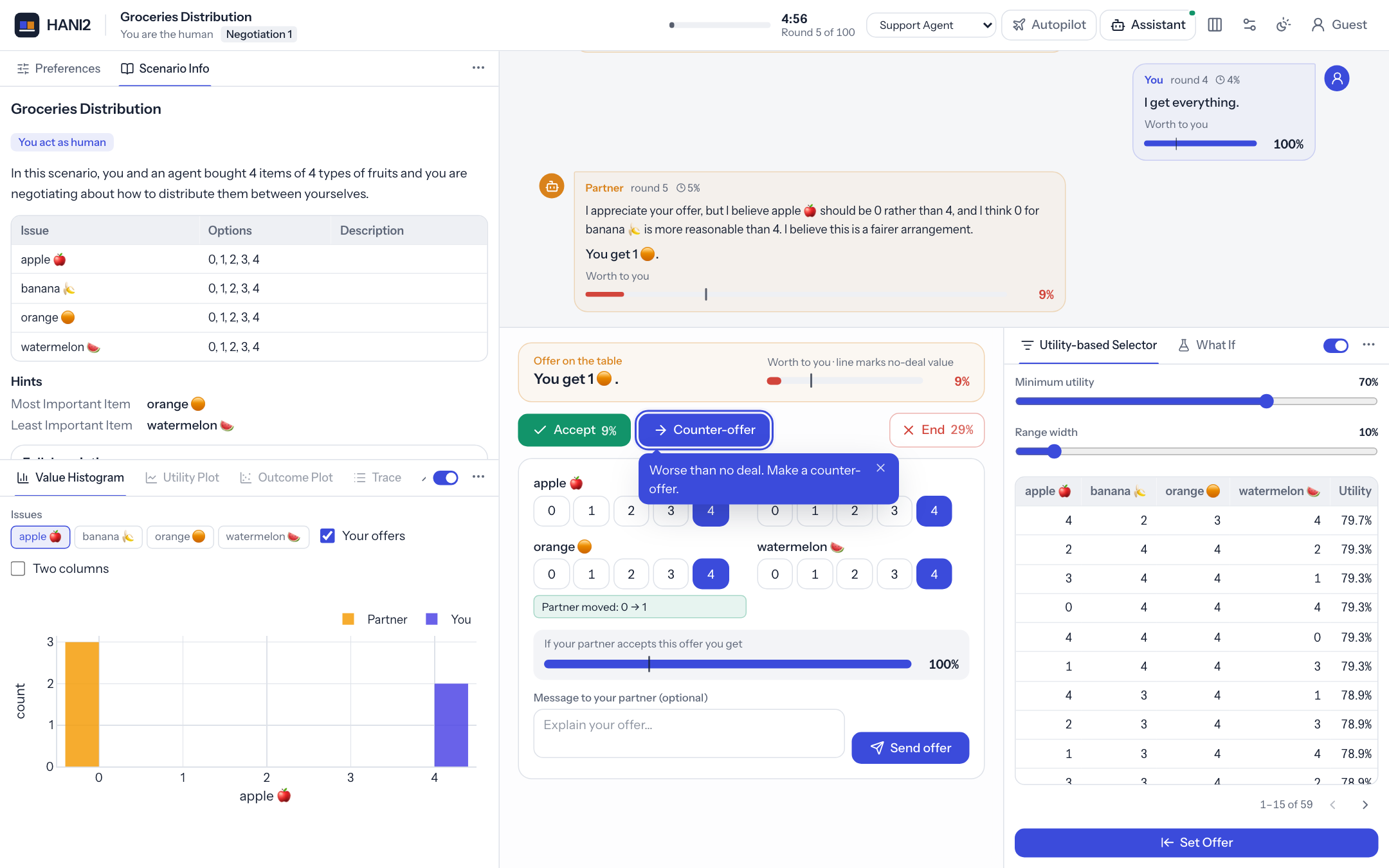
Highlights are cleared when the participant acts and replaced when the agent highlights the same target again. The participant can dismiss one with its close button. Notes stay until the agent removes them by passing text=None, or a new scenario loads.
Try this: add duration=5 to the highlight so it fades after five seconds, or use style="spotlight" to dim everything else.
Level 9: layout and custom panels
The last agent reshapes the page. set_layout(view=...) switches between the full, simple and focus views. show_panel(panel_id, title, components, placement=...) shows a panel built from the same hani2.tools.ui components tools use, and on_panel_action receives button clicks.
"""Level 9 - reshape the interface and build your own panel (no LLM).

When the negotiation starts the agent switches to the calm *focus* layout and
shows a panel asking how the participant wants to work. Its buttons call
``on_panel_action``. On every turn the panel lists the three offers the partner
made that are best for the participant, each with a button that copies it into
the counter-offer.
"""

from hani2.support_agent.runtime import SupportAgent
from hani2.tools import ui


class PanelAgent(SupportAgent):
    def on_event(self, event_name: str, nmi=None) -> None:
        if not self.user_enabled:
            return
        if event_name == "negotiation_started":
            self.set_layout(view="focus")
            self.show_panel(
                "welcome",
                "How do you want to work?",
                [
                    ui.markdown("I hid the analysis tools so you can focus on the offers."),
                    ui.row(
                        ui.button("Keep it simple", "simple", variant="primary"),
                        ui.button("Show me everything", "full"),
                    ),
                ],
            )
        elif event_name == "action_requested":
            self.show_best_offers()

    def show_best_offers(self) -> None:
        ctx = self.context()
        offers = [h for h in ctx["history"] if h["by"] == "partner" and h["offer"]]
        best = sorted(offers, key=lambda h: h["utility"] or 0, reverse=True)[:3]
        if not best:
            return
        rows = [ui.outcome(h["offer"], h["utility"]) for h in best]
        buttons = [ui.button(f"Use offer {i + 1}", "use", payload={"offer": h["offer"]}) for i, h in enumerate(best)]
        self.show_panel(
            "best",
            "Partner's best offers for you",
            [*rows, ui.row(*buttons)],
            placement="side",
        )

    def on_panel_action(self, panel_id: str, action: str, payload: dict) -> None:
        if panel_id == "welcome":
            self.set_layout(view="simple" if action == "simple" else "full")
            if action == "full":
                self.focus_tool("Utility Plot")
            self.close_panel("welcome")
            self.message_user("Done. Ask me if you want the layout changed again.", channel="toast")
        elif panel_id == "best" and action == "use":
            self.session_state["actions"]["set_offer"](payload["offer"])
            self.highlight("send", "Review the offer, then send it.")
Run it with "agent_class": "level9_panels:PanelAgent". When you press Start:
- The layout switches to the focus view, hiding the tools.
-
A How do you want to work? panel appears in the assistant dock, which opens on its own. Keep it simple switches to the simple view; Show me everything restores the full view and brings the Utility Plot to the front. Either way the panel closes and a notification confirms it.
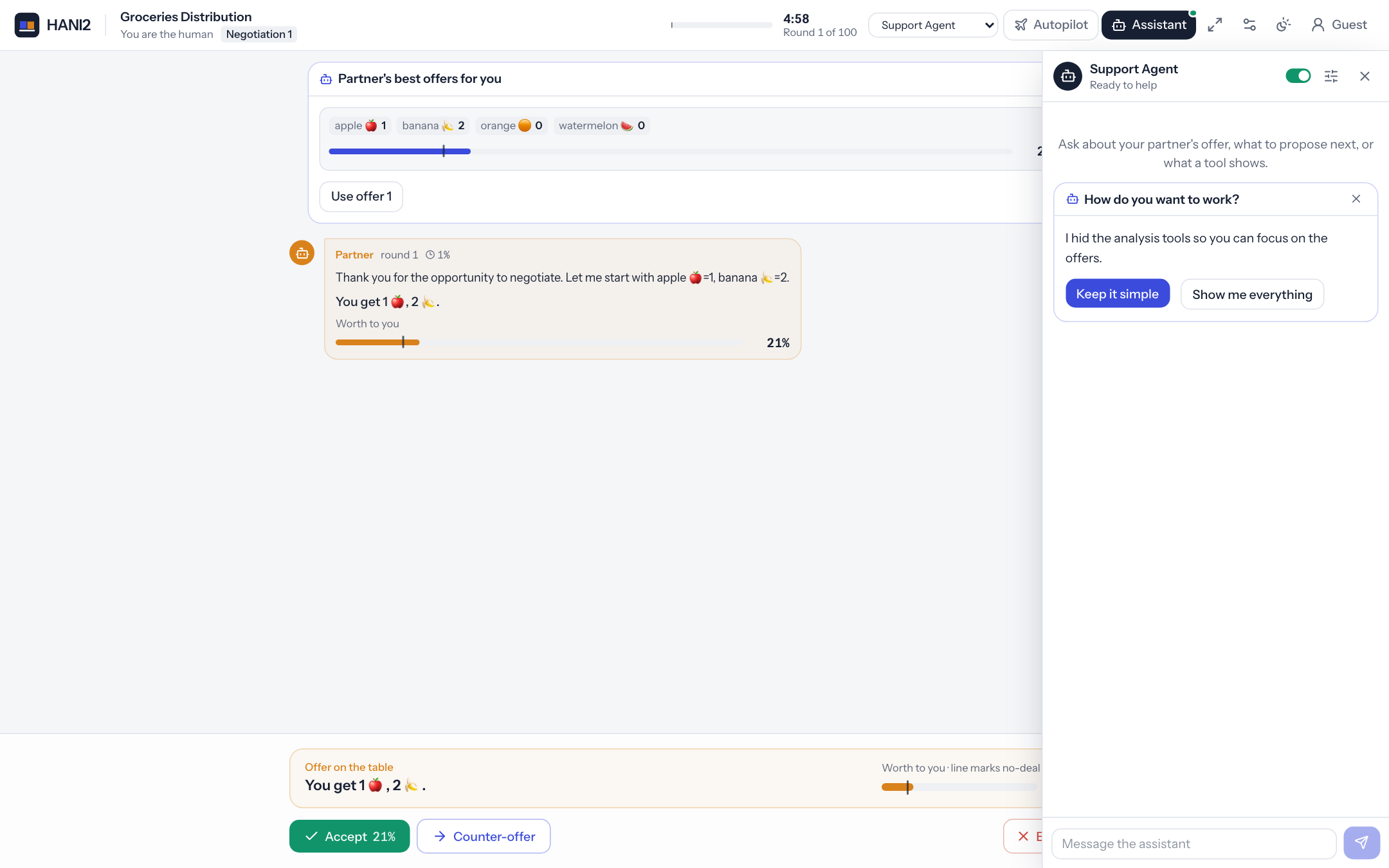 3. On each of your turns a Partner's best offers for you panel above the action panel lists the three partner offers worth most to you, each with a Use offer button. Clicking one copies the offer into your counter-offer and highlights Send.
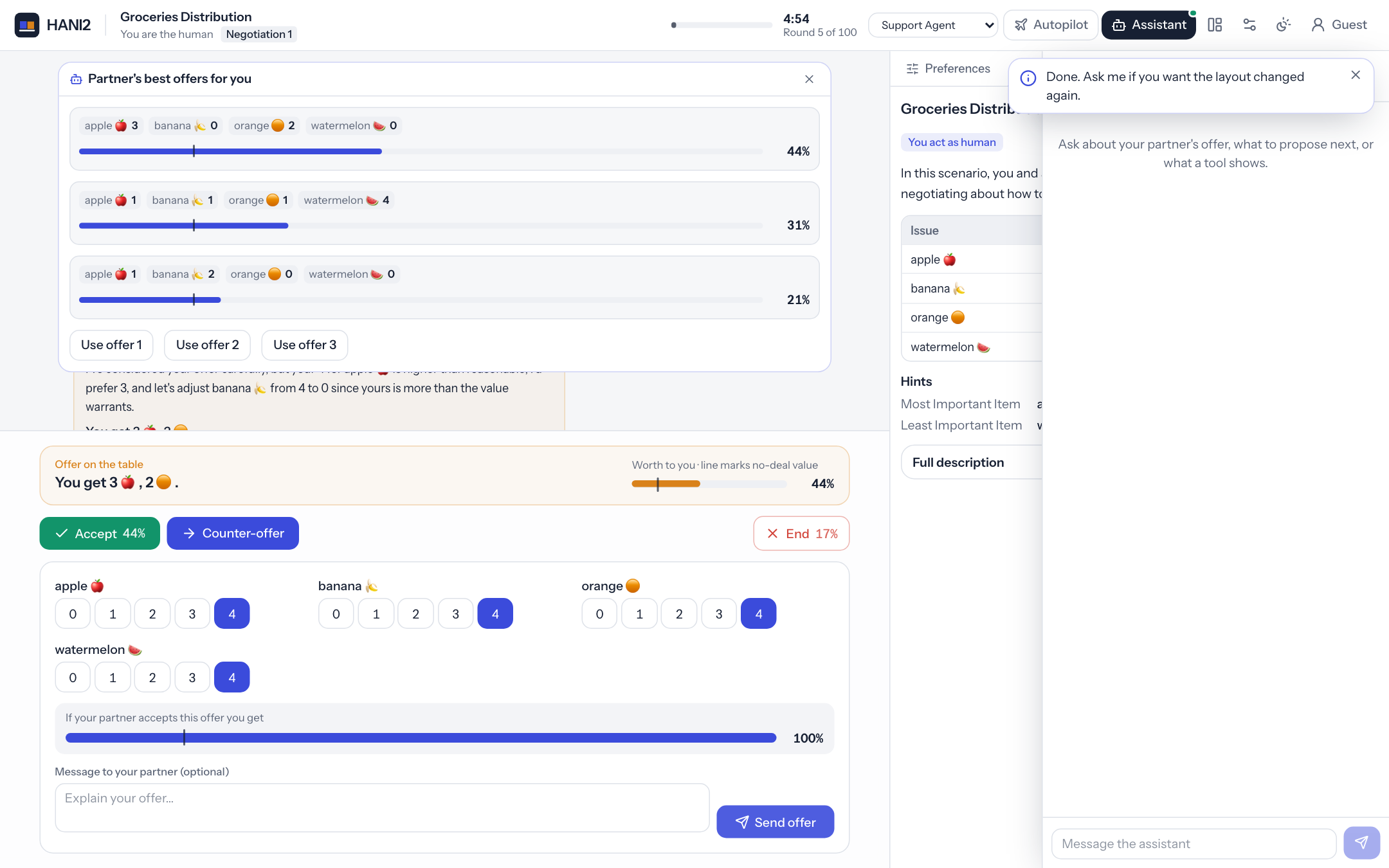
The button's payload travels back to on_panel_action, which is how the panel knows which offer was chosen. placement is assistant (in the dock), side (above the action panel) or modal (a dialog). Showing a panel with the same panel_id replaces it. See Build a tool for every component you can use.
Try this: add a ui.table(...) of the partner's last five offers to the best-offers panel, or move the welcome panel to placement="modal".
Level 10: bring and use tools
An agent can bring tools of its own and operate the participant's tools. This agent ships a
Deal Compass, a small tool with timing = "agent", so nobody sees it until the agent adds it
when the negotiation starts. On every turn it then uses the participant's Utility-based
Selector: it sets the minimum-utility slider a little above the partner's offer and picks the
best row, which fills the counter-offer.
"""Level 10 - bring your own tool, and use the participant's tools (no LLM).

The agent ships a tool of its own, the *Deal Compass*. Its ``timing`` is
``"agent"``, so nobody sees it until the agent decides to add it: here, when the
negotiation starts. Then, every time it is the participant's turn, the agent
*uses* a tool the participant already has, the Utility-based Selector: it moves
the selector's minimum-utility slider just above the partner's offer and picks
the best row, which fills the counter-offer. The agent never needed to know how
the selector works inside: it reads the tool's inputs, buttons and table with
:meth:`read_tool` and operates them with :meth:`use_tool`, exactly like the
built-in LLM agent does with the ``read_tool`` / ``use_tool`` functions.

Capabilities used: ``tool_add`` (add the compass), ``tool_use`` (operate the
selector) and ``fill_offer`` (the selector fills the offer on the agent's
behalf, so the agent needs this too).
"""

from hani2.support_agent.runtime import SupportAgent
from hani2.tools import ui
from hani2.tools.base import Tool


class DealCompassTool(Tool):
    """How the offer on the table compares with your no-deal value, issue by issue."""

    name = "Deal Compass"
    description = "How the partner's offer compares with walking away, issue by issue."
    agent_hint = "Read it to see which issues of the partner's offer are weak for the participant."
    icon = "compass"
    pane = "side"
    timing = "agent"  # only the support agent adds it

    def view(self):
        offer = self.session.partner_offer()
        if offer is None or self.human_ufun is None:
            return [ui.text_block("Waiting for the partner's first offer.", muted=True)]
        u = float(self.human_ufun(offer))
        rv = float(self.human_ufun.reserved_value or 0)
        verdict = "better than walking away" if u > rv else "worse than walking away"
        rows = []
        values = getattr(self.human_ufun, "values", None)
        if values is not None:
            for issue, fun, v in zip(self.issues, values, offer):
                rows.append({"Issue": issue.name, "Partner offers": v, "Your score": float(fun(v))})
        out = [ui.stat("This offer is worth", f"{u:.0%}", hint=verdict, kind="good" if u > rv else "bad")]
        if rows:
            out.append(ui.table(rows, formats={"Your score": "percent"}))
        return out  # the base class re-renders the tool whenever it is the participant's turn


class ToolsmithAgent(SupportAgent):
    tools = [DealCompassTool]

    def on_event(self, event_name: str, nmi=None) -> None:
        if not self.user_enabled:
            return
        if event_name == "negotiation_started":
            res = self.add_tool("Deal Compass")
            if res.get("ok"):
                self.message_user("I added the Deal Compass beside your offer.", channel="toast")
        elif event_name == "action_requested":
            self.prepare_counter_offer()

    def prepare_counter_offer(self) -> None:
        offer = self.session.partner_offer()
        ufun = self.session_state.get("human_ufun")
        if offer is None or ufun is None:
            return
        # aim a little above what the partner offers now; if no option is in that band,
        # look in the bands above it, then below it
        start = min(95, int(float(ufun(offer)) * 100) + 10)
        bands = [b for b in range(start, 100, 15)] + [b for b in range(start - 15, -1, -15)]
        for low in bands:
            res = self.use_tool("Utility-based Selector", inputs={"min_util": low, "width": 15},
                                action="pick", row=0)
            if res.get("ok"):
                self.show_on_board(f"I filled your offer with the best option between {low}% and "
                                   f"{min(100, low + 15)}%. Check it, then send.")
                return
Run it with "agent_class": "level10_toolsmith:ToolsmithAgent", or
hani2 --support-agent examples/support_agent_tutorial/level10_toolsmith.py:ToolsmithAgent.
When you press Start:
- A Deal Compass tab appears beside your offer, marked as added by the assistant, with a notification. It shows what the partner's offer is worth to you, issue by issue.
- On each of your turns, the Utility-based Selector's slider moves, its best row is selected and your counter-offer fields fill in. The status board says what it did.
The agent never looks inside the selector. use_tool works from what the tool shows: input names,
button actions and selectable tables, the same things read_tool reports. That is why a tool
written for people needs no extra code for an agent, and why the built-in LLM agent can use tools
it has never seen (it has the read_tool and use_tool functions).
The selector's Set Offer and row selection fill the offer, so the agent needs fill_offer as
well as tool_use. Switch Fill the offer off in the assistant's settings and the selector still
moves, but your offer stays as it is.
Try this: read the compass with self.read_tool("Deal Compass")["text"] and post its first line
to the status board, or remove the compass with self.remove_tool("Deal Compass") once the
negotiation ends.
Testing agents offline
hani2.testing.make_session builds a complete headless session, with a scenario, an opponent and your agent, without a browser or a server. It writes everything to a temporary HANI2_HOME unless you pass home=.
from hani2.testing import make_session


def test_level8_points_at_a_button():
    s = make_session(agent_class="level8_spotlight:SpotlightAgent", partner="BoulwareTBNegotiator")
    s.start()
    s.wait_for_turn()       # the partner moved; it is the participant's turn
    s.wait_agent_idle()     # the agent's on_event finished
    assert s.highlights[-1]["target"] in ("reject", "accept", "partner_offer")


def test_level1_echo():
    s = make_session(agent_class="level1_hello:HelloAgent")
    s.user_chat("hi there")
    assert s.chat[-1]["text"] == "Hello! You said: hi there"
Run the tests from the folder that holds your agent (pytest puts the test file's folder on sys.path), or add the folder to sys.path in a conftest.py.
make_session takes these keyword arguments:
| Argument | Default | Meaning |
|---|---|---|
agent_class |
None |
Your agent as module:Class. Overrides the settings file for this session only. |
support_settings |
None |
Other support agent settings for this session, such as {"autonomy": "suggest"}. |
partner |
"BoulwareTBNegotiator" |
The opponent. |
scenario_type |
"Trade" |
The scenario type to load. |
n_steps |
20 |
The step limit. |
time_limit |
None |
The time limit in seconds. |
user |
"tester" |
The user name. |
mode |
"main" |
main or guest. |
is_admin |
False |
Whether the user is an admin. |
home |
None |
The HANI2_HOME to use. |
query |
None |
Query parameters, as if from the URL. |
load |
True |
Whether to load a scenario immediately. |
The returned session has the session's own methods (start, send_counter, accept, end, user_chat, set_draft, snapshot, ...) plus waiting helpers:
| Helper | Waits until |
|---|---|
wait(predicate, timeout=30.0) |
predicate() is true. Returns whether it became true. |
wait_for_turn(timeout=30.0) |
It is the participant's turn, or the negotiation is over. |
wait_until_done(timeout=60.0) |
The negotiation has ended. |
wait_agent_idle(timeout=30.0) |
The support agent finished its current turn. |
play_counters(n, text=None) |
Sends n counter-offers as the participant. |
Everything the browser would receive is recorded in s.hub.messages; s.hub.of_type("toast") filters by message type. The agent itself is s.support_agent, and you can call its dispatcher directly: s.support_agent.dispatcher.execute("assess_partner_offer", {}).
Testing LLM agents without a model
To test an LLM agent deterministically, replace SupportAgent._complete with a function that returns scripted replies. Each reply is a dictionary in the same shape the real method returns:
import json

from hani2.support_agent import SupportAgent
from hani2.testing import make_session


def test_coach_fills_the_offer(monkeypatch):
    s = make_session(agent_class="level3_llm_coach:CoachAgent", support_settings={"autonomy": "suggest"})
    s.start()
    s.wait_for_turn()
    issue = s.issues[0]
    value = list(issue.all)[-1]
    replies = [
        {"role": "assistant", "content": "", "tool_calls": [{
            "id": "1", "type": "function",
            "function": {"name": "set_offer", "arguments": json.dumps({"outcome": {issue.name: value}})},
        }]},
        {"role": "assistant", "content": "I filled in an offer for you."},
    ]
    monkeypatch.setattr(SupportAgent, "_complete", lambda self, tools, force_action=False: replies.pop(0))
    s.user_chat("help me")
    assert s.draft[issue.name] == value
    assert s.chat[-1]["text"] == "I filled in an offer for you."
The examples/agent_template folder has a copyable agent with a matching offline test (test_my_agent.py).
Troubleshooting
The default agent answers instead of mine. The class could not be loaded. The server log shows a line like:
[hani2] WARNING: could not load custom agent_class 'level1_hello:HelloAgent' (No module named 'level1_hello'); using the default agent
Check that you started hani2 from the folder holding the module with PYTHONPATH=$PWD, that the name is module:Class (or module.Class), and that the class subclasses SupportAgent. An exception in your constructor also falls back to the default agent, with a traceback in the log.
My change has no effect. Restart the server. Each session builds its agent once, and sessions stay in memory.
There is no Assistant button. The agent is off for this session: check mode in the settings and --support-agent or HANI2_SUPPORT_AGENT. With auto, only admins get an agent.
The agent does not react to events. It is switched off in the dock header (Prolific participants start with it off), or, for the default on_event, the matching proactive flag is false or proactive_note returned None.
"Support agent error" in the chat. The model call failed. Check that Ollama is running and the model is pulled, or that the environment variable named in api_key_env is set. The server log has the full traceback.
"I'm still working on the previous request". Only one model turn runs at a time. Wait for the current one to finish, or lower max_tool_iterations.
Autopilot does not move. Check that autopilot is allowed (autopilot_settings.json), that the driver is Support Agent, and that the agent has the submit_counter, accept and end capabilities. See Autopilot.