Build a tool
This tutorial builds three tools step by step, from a few numbers to an interactive form and a live chart. All three are in examples/tools in the repository, so you can run them as you read. By the end you will know the Tool class, its lifecycle hooks, the UI components, how to react to the participant's input, how to register a tool and how to test it without a browser.
The Tools guide lists the built-in tools and the env.json options. The generated Python API reference has every docstring.
Set up
You need a working installation (pip install hani2, then hani2 setup). Work in a folder of your own, or in examples/tools of a source checkout:
Tools are registered by import path. Add them to the "tools" section of ~/negmas/hani2/settings/env.json (or $HANI2_HOME/settings/env.json):
{
  "tools": {
    "extra": ["offer_counter:OfferCounter", "what_if:WhatIf", "concession_tracker:ConcessionTracker"]
  }
}
Keep the other keys of env.json as they are. Then start the server with your folder on the Python path, so it can import the modules:
The playground at /play needs no login. If an entry in extra cannot be imported, the server prints [hani2] could not load tool '...' in its log and starts without it.
Tools are created when a session first reaches their timing. After you change a tool's code, restart the server and reload the page with a fresh session (log out and in again, or open /play in a private window), because a running session keeps the tool objects it already created.
Step 1: a tool that shows numbers
The smallest useful tool reads the negotiation trace and shows two numbers.
"""Step 1 - the smallest useful tool: a few numbers about the negotiation."""

from hani2.tools import Tool, ui


class OfferCounter(Tool):
    name = "Offer Counter"
    description = "How many offers each side made so far."
    icon = "hash"
    pane = "side"

    def view(self):
        trace = self.trace()
        me = self.session_state.get("human_id")
        mine = sum(1 for row in trace if row[3] == me)
        return [
            ui.stats(
                ui.stat("Your offers", mine),
                ui.stat("Partner offers", len(trace) - mine),
            )
        ]
A tool is a subclass of hani2.tools.Tool. The class attributes describe it, and view() returns its UI as a list of components from hani2.tools.ui. Here ui.stats lays out two ui.stat tiles side by side.
self.trace() returns the mechanism's full trace: one row per offer, empty before the negotiation starts. Each row is a sequence with these fields:
| Index | Field | Meaning |
|---|---|---|
| 0 | time |
Seconds since the negotiation started |
| 1 | relative_time |
Progress towards the deadline, from 0 to 1 |
| 2 | step |
The negotiation round |
| 3 | negotiator |
The id of the negotiator who made the offer |
| 4 | offer |
The offer, a tuple with one value per issue (may be None for a message without an offer) |
| 5 | responses |
The responses to the offer |
| 6 | state |
The negotiation state after the offer |
| 7 | text |
The message sent with the offer, if any |
| 8 | data |
Any extra data sent with the offer |
self.session_state["human_id"] is the id of the participant's negotiator, so row[3] == me tells you who made the offer.
You never call view() yourself. The server calls it whenever the tool needs to be redrawn, and every lifecycle hook asks for a redraw by default. The Offer Counter therefore updates after every offer without any extra code.
The class attributes
| Attribute | Default | Meaning |
|---|---|---|
name |
the class name | The tab title. It must be unique among the session's tools. |
description |
"" |
One line shown as the tab tooltip, on the "switched off" placeholder, and to the support agent. |
icon |
"wrench" |
A lucide icon name in kebab case, such as "chart-line". |
pane |
"upper" |
The default pane: "upper", "lower" or "side". |
timing |
"start" |
When the tool appears: "always" (page open), "load" (scenario loaded), "start" (negotiation started), "end" (negotiation finished) or "agent" (only when a support agent adds it). |
permanent |
False |
Always on: no enable switch, and it cannot be hidden. |
admin_only |
False |
Only sessions of admin accounts get the tool. |
guest |
True |
Whether playground and Prolific sessions get the tool. |
enabled |
True |
The default state of the enable switch. A switched-off tool shows its tab, but view() is not called until it is switched on. |
order |
100 |
Sort key inside the pane (smaller first). Tools with order 0 or 1 become the selected tab of their pane when they appear. |
agent_hint |
"" |
Advice for a support agent on when and how to use the tool. |
An admin can override pane, timing, enabled, admin_only, guest and order per deployment in env.json, without changing your code (see Tools).
Step 2: an interactive tool
The second tool lets the participant pick a value for every issue, shows what that deal is worth to them, and copies it into their counter-offer with one click.
"""Step 2 - an interactive tool: try a deal before you offer it.

Inputs are bound by ``name``; ``self.values`` holds what the user picked.
The button fills the counter-offer with the chosen outcome.
"""

from hani2.tools import Tool, ui


class WhatIf(Tool):
    name = "What If"
    description = "Pick a value for every issue and see what the deal is worth to you."
    icon = "flask-conical"
    pane = "side"
    timing = "load"

    def view(self):
        if self.human_ufun is None:
            return [ui.text_block("Load a scenario first.", muted=True)]
        inputs, outcome = [], []
        for issue in self.issues:
            options = list(issue.all) if issue.is_discrete() else [issue.min_value, issue.max_value]
            value = self.values.get(issue.name, options[0])
            outcome.append(value)
            inputs.append(ui.select(issue.name, options, value, label=issue.name))
        utility = float(self.human_ufun(tuple(outcome)))
        reserved = float(self.human_ufun.reserved_value)
        verdict = ("success", "Better than no deal") if utility >= reserved else ("error", "Worse than no deal")
        return [
            ui.grid(*inputs, cols=2),
            ui.stat("Worth to you", f"{utility:.0%}", hint=verdict[1], kind=verdict[0]),
            ui.button("Use as my offer", "use", variant="primary", icon="arrow-left-to-line",
                      disabled=not self.session_state.get("negotiation_running")),
        ]

    def on_action(self, action, payload):
        if action == "use":
            self.set_offer({i.name: self.values.get(i.name) for i in self.issues if i.name in self.values})
            self.toast("Copied into your offer", "success")
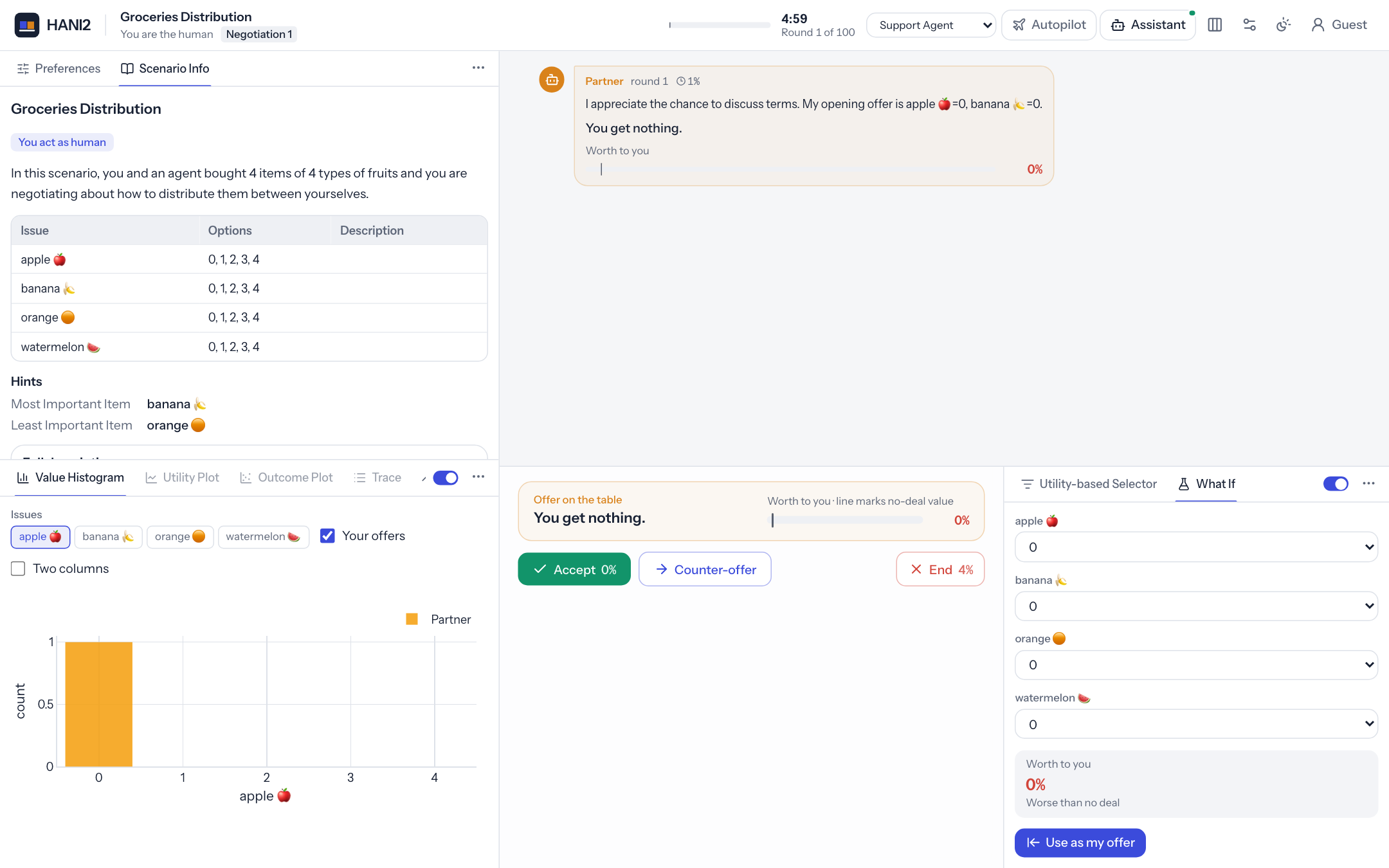
Three things are new.
Inputs are bound by name. ui.select(issue.name, options, value, label=...) creates a drop-down whose name is the issue's name. When the participant changes it, the browser sends the new value to the server and the tool's on_input(name, value) runs. The default on_input stores the value in self.values[name] and redraws the tool, so view() only needs to read self.values. Pass the current value back into the component (self.values.get(issue.name, options[0])) so the view shows what the participant chose.
Buttons carry an action. ui.button("Use as my offer", "use", ...) calls on_action("use", payload) when clicked. The payload contains the button's own payload dict merged with the current values of every input in the view.
Tools can act on the offer. self.set_offer(...) fills the participant's counter-offer editor. It does not send the offer: the participant still reviews it and presses Send. self.toast(...) shows a short notification.
The tool uses timing = "load", so it appears as soon as a scenario is loaded and the participant can explore deals before the negotiation starts. The button is disabled until then, because session_state["negotiation_running"] is false.
The verdict uses self.human_ufun.reserved_value, the participant's value on disagreement. A deal worth less than that is worse than walking away.
Handling input yourself
Override on_input when the default is not what you want. For example, a text area that should not redraw the tool on every key press:
def on_input(self, name, value):
    self.values[name] = value  # store only; no refresh while the user types
Sliders send their value when the participant releases the handle; select, radio, checkbox, switch, number and text inputs send on every change.
Tables with clickable rows
ui.table(rows, on_select="pick") makes rows clickable. A click calls on_action("pick", {"row": <row dict>, "index": <int>}). Pass selected=<index> to highlight the chosen row on the next render. The built-in Utility-based Selector uses this to fill the offer from a row:
def on_action(self, action, payload):
    if action == "pick":
        row = payload.get("row") or {}
        self.values["selected"] = payload.get("index")
        self.set_offer({k: v for k, v in row.items() if k != "Utility"})
        self.refresh()
Step 3: a live chart
The third tool plots the utility (for the participant) of the partner's offers over time and projects the trend to the deadline, so the participant can see how fast the partner concedes.
"""Step 3 - a live chart: how fast is the partner conceding?

``action_requested`` runs on every turn; it computes the partner's concession
and calls ``refresh()`` (the base class does that too) so the chart redraws.
Any Plotly figure works with ``ui.plot``.
"""

import plotly.graph_objects as go

from hani2.tools import Tool, ui
from hani2.tools.plotting import AGENT_COLOR, base_layout


class ConcessionTracker(Tool):
    name = "Concession Tracker"
    description = "The utility of the partner's offers for you, and a projection to the deadline."
    icon = "trending-up"
    pane = "lower"

    def view(self):
        me = self.session_state.get("human_id")
        points = [(row[1], float(self.human_ufun(row[4]))) for row in self.trace() if row[3] != me and row[4] is not None]
        if len(points) < 2:
            return [ui.text_block("Waiting for at least two partner offers.", muted=True)]
        (t0, u0), (t1, u1) = points[0], points[-1]
        rate = (u1 - u0) / max(t1 - t0, 1e-6)
        projected = max(0.0, min(1.0, u1 + rate * (1 - t1)))
        fig = go.Figure(go.Scatter(x=[p[0] for p in points], y=[100 * p[1] for p in points], mode="lines+markers",
                                   name="Partner offers", line=dict(color=AGENT_COLOR, width=3)))
        fig.add_trace(go.Scatter(x=[t1, 1.0], y=[100 * u1, 100 * projected], mode="lines", name="Projection",
                                 line=dict(color=AGENT_COLOR, dash="dot")))
        fig.update_layout(**base_layout(240, xaxis=dict(range=[0, 1], title="time"), yaxis=dict(range=[0, 100], ticksuffix="%")))
        return [
            ui.stats(
                ui.stat("Concession per 10% of time", f"{10 * rate:+.1%}"),
                ui.stat("Projected final offer", f"{projected:.0%}"),
            ),
            ui.plot(fig),
        ]
ui.plot accepts any Plotly figure, either a plotly.graph_objects.Figure or a figure dict. The web app applies its own fonts and light or dark colours, so keep the layout minimal. hani2.tools.plotting has helpers that give your plots the same look as the built-in ones:
| Name | What it is |
|---|---|
base_layout(height=260, legend=True, **kw) |
A layout dict with the standard margins, a horizontal legend above the plot, transparent backgrounds and hovermode="closest". Extra keyword arguments are merged in. Use it as fig.update_layout(**base_layout(240, xaxis=...)). |
HUMAN_COLOR |
The colour used for the participant (#4f46e5). |
AGENT_COLOR |
The colour used for the partner (#f59e0b). |
NEUTRAL_COLOR |
A neutral grey (#64748b). |
SEQUENCE |
A list of six colours for categorical series, starting with the two party colours. |
party_color(name, human_id) |
HUMAN_COLOR when name is the participant's id, else AGENT_COLOR. |
trace_frame(trace, issues=None) |
The trace as a pandas DataFrame with the columns time, relative_time, step, negotiator, offer, responses, state, text and data; with issues, one extra column per issue holding that issue's value in each offer. |
TRACE_COLUMNS |
The tuple of those column names. |
The tracker needs no hook of its own: action_requested runs every time it becomes the participant's turn, and the base implementation redraws the tool.
Lifecycle hooks
Override any of these methods to react to the negotiation. All of them except init and action_to_execute call self.refresh() by default, so call super() (or self.refresh()) when you override them and want a redraw.
| Hook | Called |
|---|---|
init(session_state) |
Once, when the tool is created. |
scenario_loaded(session_state, scenario) |
After each scenario is loaded. |
negotiation_started(session_state, nmi) |
When a negotiation starts. |
action_requested(session_state, nmi) |
Every time it becomes the participant's turn. |
action_to_execute(session_state, nmi, action) |
Just before the participant's action (an SAOResponse) is executed. |
action_executed(session_state, nmi, action) |
After the participant's action is executed. |
negotiation_ended(session_state, nmi) |
When a negotiation ends. |
nmi is the participant's view of the negotiation (a negmas SAONMI), for example nmi.n_steps or nmi.time_limit. Use it to reset per-negotiation state, as the built-in Utility-based Selector does:
def negotiation_started(self, session_state, nmi):
    self._inverter = None
    super().negotiation_started(session_state, nmi)
Hooks run on server threads. Keep them quick; for slow work, see Long-running work.
What a tool can read and do
Properties:
| Property | Value |
|---|---|
session |
The NegotiationSession that owns the tool. |
session_state |
The session's state dict (human_id, negotiation_running, scenario_dir, user, is_practice_round and more). |
scenario |
The loaded negmas Scenario, or None. |
mechanism |
The running negmas mechanism, or None before the negotiation starts. |
issues |
The scenario's issues (empty before a scenario is loaded). |
human_index |
The participant's index in the scenario. |
human_ufun |
The participant's utility function. |
agent_ufun |
The partner's utility function. Show it only to admins. |
is_admin |
Whether the session belongs to an admin account. |
values |
The current values of the tool's inputs, by name. |
params |
Keyword arguments given to the constructor (empty for tools created by the server). |
enabled |
Whether the tool is switched on. |
Methods:
| Method | What it does |
|---|---|
trace() |
The mechanism's full trace as a list of rows (see step 1). |
context() |
The live negotiation snapshot, the same dict the support agent sees (see below). |
outcome_dict(outcome) |
Turns an outcome tuple into {issue name: value}. |
set_offer(outcome) |
Fills the participant's counter-offer. Accepts a tuple or a dict of issue name to value; returns {"ok": ..., "applied": ..., "unrecognised": ...}. Issue names are matched exactly, then ignoring case, then by substring. |
set_text(text) |
Fills the message box. Returns {"ok": False, ...} when an admin switched off human messages. |
toast(message, level="info") |
Shows a notification. Levels: info, success, warning, error. |
refresh() |
Asks the server to redraw the tool. Several calls in quick succession are merged into one redraw. |
context() returns these keys: issues (each with name and either min and max or values), partner_offer, partner_offer_utility, partner_message, draft_offer, draft_offer_utility, draft_message, reserved_value, is_my_turn, phase, step, n_steps, relative_time, time_left, history (the last offers, each with by, offer, message and utility), result and tools.
A tool can also react when the participant edits the counter-offer by defining draft_changed(self, session_state, draft). It is optional and not part of the base class; the server calls it, when present, with the new draft as {issue name: value}.
Offer pickers: OutcomeSelector
Many tools exist to suggest an offer. hani2.tools.OutcomeSelector packages that pattern: override get_outcome() to return an outcome tuple, and optionally selector_view() to show controls above the button. The base class appends a full-width Set Offer button that is enabled while the negotiation runs and calls set_offer(self.get_outcome()).
from hani2.tools import OutcomeSelector, ui


class BestForMe(OutcomeSelector):
    name = "Best for me"
    description = "Fill the offer with your best outcome."
    button_label = "Use my best deal"

    def selector_view(self):
        return [ui.markdown("Puts your favourite outcome into the offer.")]

    def get_outcome(self):
        return self.human_ufun.best() if self.human_ufun is not None else None
OutcomeSelector defaults to pane = "side" and the wand-sparkles icon. Override can_set() to change when the button is enabled, and button_label to rename it. The built-in Random and Utility-based Selector tools are OutcomeSelector subclasses.
Long-running work
view() and the hooks block the session while they run. For slow work, such as calling a language model, run it in the background with self.session.submit(fn), show a busy state, and call self.refresh() when the result is ready. The built-in LLM tool follows this pattern:
def on_action(self, action, payload):
    if action == "generate":
        self.busy = True
        self.refresh()
        self.session.submit(self._generate)   # runs on a worker thread

def _generate(self):
    try:
        self.result = slow_call()
    finally:
        self.busy = False
        self.refresh()
Errors
If view() raises, the tool shows a red alert with the error message instead of its content, and the traceback is printed in the server log. If on_action raises, the participant sees an error toast. Errors in hooks are printed in the server log and do not stop the negotiation.
Register the tool
There are two ways to make a tool available.
In env.json or on the command line. List the class in tools.extra as module:Class, module.Class or path/to/file.py:Class, as in the set-up section, or pass it with hani2 --tools. This is the quickest way for a single study. The module must be importable by the server.
In a package. Publish the tool through the hani2.tools entry-point group in your package's pyproject.toml:
[project.entry-points."hani2.tools"]
what_if = "my_tools.what_if:WhatIf"
offer_counter = "my_tools.offer_counter:OfferCounter"
Once the package is installed in the same environment as HANI2, every session gets the tools. Admins can still disable them or change their defaults in env.json.
Make your tool usable by a support agent
You do not have to do anything: a support agent with the Use tools capability reads any tool as text and operates its inputs, buttons and selectable tables (see Support agent). A few habits make that work better:
- Write a clear
description; the agent sees it inlist_tools. - Add an
agent_hintsaying when the tool helps and what to press, for example"Set 'target' to the utility you want, then press Find." - Give inputs and actions meaningful names (
min_util,find), and labels on sliders and selects. - Put the key result in a
ui.stator a short table; charts are only summarised for the agent. - Change the negotiation only through the tool helpers (
set_offer,set_text) or the session's methods. When the agent presses your button, those calls follow the agent's permissions.
To control exactly what the agent reads, override describe_for_agent(max_chars) and return text.
Set timing = "agent" for a tool that should appear only when a support agent adds it, then
register it as usual or pass it on the command line:
Test the tool
hani2.testing.make_session creates a headless session, without a browser or a server, and loads a scenario. It writes everything under a temporary HANI2_HOME unless you pass home=. You can create a tool directly from the session's state and drive it:
from hani2.testing import make_session
from what_if import WhatIf


def test_what_if_fills_the_offer():
    s = make_session()            # a Trade scenario against BoulwareTBNegotiator
    s.start()
    s.wait_for_turn()
    tool = WhatIf(s.ss)
    issue = s.issues[0]
    last = list(issue.all)[-1]
    tool.on_input(issue.name, last)
    view = tool.render()
    assert view[1]["type"] == "stat"
    tool.on_action("use", {})
    assert s.draft[issue.name] == last
render() is what the server calls: it returns the list of component dicts from view(), or a single error alert if view() raised. Check its output to test what the participant will see.
To test registration and pane placement as well, write an env.json into the test home before you create the session, then find the tool through the session's tool controller:
import json

from hani2.testing import make_session


def test_tool_is_registered(tmp_path):
    settings = tmp_path / "settings"
    settings.mkdir()
    (settings / "env.json").write_text(json.dumps({"tools": {"extra": ["what_if:WhatIf"]}}))
    s = make_session(home=str(tmp_path))
    tool = s.tool_controller.find("What If")
    assert tool is not None and s.tool_state(tool)["pane"] == "side"
    tid = s.tool_state(tool)["id"]
    s.tool_input(tid, s.issues[0].name, list(s.issues[0].all)[0])   # as the browser would
    assert s.render_tool(tid)["view"]
Useful parts of the test session:
make_session(partner=..., scenario_type="Trade", n_steps=20, time_limit=None, is_admin=False, mode="main", query=None, load=True):partneris the opponent spec,is_admin=Truegives the session the admin-only tools, andmode="guest"simulates the playground.s.start(),s.wait_for_turn(),s.play_counters(n)(send the current draftntimes),s.accept(),s.end()ands.wait_until_done()drive the negotiation.s.tool_input(tid, name, value)ands.tool_action(tid, action, payload)deliver input exactly as the browser does.s.hub.messagesrecords every message the browser would have received, ands.hub.of_type("toast")filters them by type.
Make sure the folder with your tool module is importable in the tests, for example with a conftest.py that adds it to sys.path.
Component reference
Every helper in hani2.tools.ui returns a plain dict (a Component) that the web app renders. Arguments that are None are left out. Values are passed through jsonable, so numpy numbers, tuples and NaN are safe.
Text and status
| Function | Renders |
|---|---|
markdown(text, *, size=None) |
GitHub-flavoured Markdown, tables included. size: sm, md or lg. |
text_block(text, *, muted=False) |
A plain paragraph; muted makes it grey. |
heading(text, level=3) |
A heading; levels 1 and 2 are largest, 4 and above smallest. |
alert(text, kind="info", title=None) |
A coloured box with Markdown text. kind: info, success, warning, error or neutral. |
badge(text, kind="neutral") |
A small label. kind: primary, success, warning, error or neutral. |
stat(label, value, *, hint=None, kind=None) |
A tile with a label, a large value and an optional hint. kind success, error or warning colours the value. |
stats(*items) |
A responsive row of stat tiles. |
kv(data, title=None) |
A two-column list of keys and values from a dict or a list of pairs. |
progress(value, label=None, kind=None) |
A progress bar; value from 0 to 1. kind success or error changes the colour. |
outcome(values, utility=None, label=None) |
A compact outcome card: one chip per issue, plus a utility gauge (with the participant's value on disagreement marked) when utility is given. |
html(content) |
Sanitised HTML. Prefer markdown. |
divider() |
A horizontal rule. |
Plots and tables
| Function | Renders |
|---|---|
plot(fig, *, height=None, key=None) |
A Plotly figure (a Figure or a figure dict). height overrides the figure height in pixels. key is accepted but the web app does not use it. |
table(rows, columns=None, *, on_select=None, page_size=25, formats=None, selected=None, max_height=None, searchable=False, sortable=True, dense=True) |
A paged data table. rows is a list of dicts or a pandas DataFrame; columns picks and orders the columns (default: all, in order of appearance). on_select makes rows clickable and names the action. formats maps a column to percent (0.5 shows as 50.0%), float (two decimals), int or text. selected highlights a row index. max_height limits the height in pixels. searchable adds a search box; sortable lets column headers sort. dense is accepted but the web app does not use it. |
Inputs
Every input has a name. Changing it calls the tool's on_input(name, value).
| Function | Renders |
|---|---|
select(name, options, value=None, *, label=None, disabled=False) |
A drop-down. |
multiselect(name, options, value=(), *, label=None) |
A set of toggle chips; the value is a list. |
radio(name, options, value=None, *, label=None) |
A segmented control. |
slider(name, min, max, value, *, step=1, label=None, suffix=None) |
A slider with the value shown next to the label, followed by suffix (for example "%"). Sends its value on release. |
number(name, value, *, min=None, max=None, step=None, label=None) |
A number field. An empty field sends None. |
checkbox(name, value, *, label=None) |
A checkbox. |
switch(name, value, *, label=None) |
A toggle (rendered like a checkbox). |
text(name, value="", *, label=None, placeholder=None) |
A single-line text field. |
textarea(name, value="", *, label=None, placeholder=None, rows=3) |
A multi-line text field. |
options for select, multiselect and radio can be:
- a list of values, each used as its own label:
["Low", "High"]; - a dict of label to value:
{"Text and offer": "both", "Text only": "text_only"}; - a list of dicts with
valueand an optionallabel.
Buttons
| Function | Renders |
|---|---|
button(label, action, *, payload=None, variant="secondary", icon=None, disabled=False, full=False, tooltip=None) |
A button that calls on_action(action, payload), with the current input values merged into payload. variant: primary, secondary, success, danger or ghost. icon is a lucide icon name. full stretches it to the full width. |
Layout
| Function | Renders |
|---|---|
row(*children, gap=3, wrap=True, align=None) |
Children side by side, wrapping on narrow panes unless wrap=False. align: end or center (default top). None children are skipped. |
column(*children, gap=3) |
Children stacked vertically. |
grid(*children, cols=2, gap=3) |
A responsive grid; with cols above 1 it fits as many columns of at least 260 pixels as the pane allows and collapses to one column on narrow panes. |
card(*children, title=None, collapsible=False, collapsed=False) |
A bordered card with an optional title. A collapsible card opens and closes when its title is clicked; collapsed sets the initial state. |
gap is in steps of a quarter of the base font size (3 is 0.75 rem).
Helpers
| Name | What it is |
|---|---|
Component |
The type of every component: dict[str, Any]. |
jsonable(x) |
Converts numpy values, tuples, sets, dates and other objects to JSON-friendly values. NaN becomes None and infinity becomes "inf" or "-inf". |
The same components build the custom panels a support agent can show with show_panel; see the support agent tutorial.